
FiveM Car Customization: New Vehicle Studio Add-ons
FiveM car customization in the FiveMRides Vehicle Studio now has five new add-ons for any car you upload: a windshield banner with window decals, a fleet generator with a unit number per car, an overland kit, a custom interior and barn find wear. Each is built into the car files, with no script needed for the look, and each can be an extra or a tuning shop option.
- Where: the left rail of the Vehicle Studio, in the same 3D editor as the other tools.
- Prices per car: banner free, fleet free, overland kit free, interior free, wear free.
- Scope: unit numbers are per vehicle; banner, overland parts and interior dye are per model; wear is a livery.
- Preview: the 3D preview is free; credits are used only at build time, for the tools that have a price.
The five add-ons at a glance
| Add-on | What it does | Per car or per model | Guide |
|---|---|---|---|
| Windshield banner | Text or image band on the windscreen, decals dragged on any window, removal of stickers already on the glass | Per model (it is part of the car files) | Read |
| Fleet generator | Up to 60 numbered units from one car, plus name, logo and stripe | Number per vehicle, design per model | Read |
| Overland kit | Roof rack, light bar, pods, bull bar, snorkel, spare carrier, flaps, sliders | Per model, switched per car as extras or tuning options | Read |
| Custom interior | Seat colour, stitching, headrest logo, glowing dash screen | Dye per model; GTA interior colour per vehicle | Read |
| Barn find wear | 5 levels from Used to Wreck, rust survives a respray | Per model, the level is picked per car as a livery | Read |
How do I use the new Vehicle Studio add-ons?
- Upload your car. Open the Vehicle Studio and upload one vehicle.
- Open an add-on. Pick it in the left rail and edit it in the 3D view.
- Choose how it is fitted. Where the game allows it: always on, an extra (1 to 12) or a tuning shop option.
- Check the quote. Each add-on appears as a line in “Your build” before you pay.
- Build and install. Download one resource and add it to your server.
Where do the cars come from?
The Studio edits a car you bring. If you need the vehicles first, browse FiveM debadged cars, FiveM police cars, the EMS pack or FiveM trucks. To bring a car from a GTA 5 mod, use the FiveM car converter. For a paint design, the Livery Studio makes the livery and the add-ons here sit on top of it.
Using several add-ons on one car
You can combine them with the existing tools: LED strips, tow hitch, parts, rims and tint. Extras the car already uses, and extras taken by another add-on in the same build, are greyed in the tool and refused by the server. Two combinations are refused for now with a clear message: barn find wear together with a Livery Studio livery, and a fleet stripe livery together with wear, because both use the livery layer.
What we saw in game
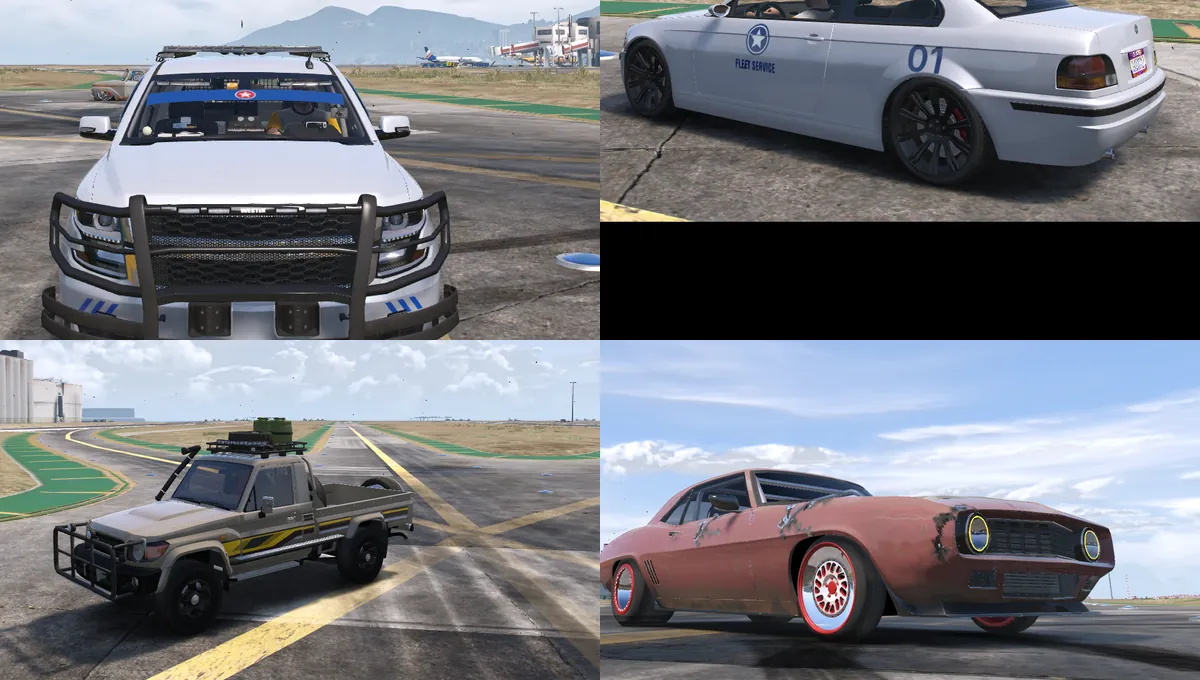
We saw all five on test cars in game on Nov 2: banners on a hypercar and a police SUV, a numbered fleet on a coupe and a sedan, the overland kit on two pickups and a sedan, interior seat colour and headrest logos on a coupe and an SUV, and heavy wear on a pickup and a muscle car. Still being checked: the glowing dash screen of the interior add-on, the Extra and Tuning versions of the banner and the removal of old window stickers, the new spare wheel options of the overland kit, and the racing seat logo protection. Other cars, servers and GTA V Enhanced have not been tested.
New Vehicle Studio add-ons questions
What are the new Vehicle Studio add-ons?
A windshield banner with window decals, a fleet generator with unit numbers, an overland kit, a custom interior and barn find wear.
How much do they cost?
Per car: windshield banner free, fleet generator free, overland kit free, custom interior free, barn find wear free.
Do I need a script to use them?
No for the look: everything is built into the car files. Small optional scripts add commands such as /unit for the fleet and /overland for the kit.
Can players switch the parts on and off?
Where the game allows it, yes. You choose always on, an extra (1 to 12) or a tuning shop option for each element.
Is there a FiveM vehicle editor in the browser?
Yes, the FiveMRides Vehicle Studio at /debadger/ is a 3D browser editor: debadge, lights, seats, rims, tint, LED strips, a tow hitch and now these five add-ons, with one resource as the result.
Which cars work?
Any car you have the right to modify can be tried. The tool measures the car and tells you when a feature cannot be built cleanly.
Is the preview free?
Yes. Credits are used only when you build, and only for the tools that have a price. See the credits guide for the full price list.
Can I use my own logos?
Yes, with artwork you have the right to use. Names and logos of real brands are refused.