
FiveM Car Lights Explained: vehicle_lightsemissive and Light IDs
GTA car lights are not separate light objects. They are parts of the car mesh that use a special shader, vehicle_lightsemissive, and the game lights them according to a light ID stored in the mesh. A brake light is just a surface with the brake ID, a headlight is a surface with the headlight ID. Once you know that, you can make any part of a car, such as an LED strip, follow the brakes, indicators or headlights.
- Shader:
vehicle_lightsemissivemakes a surface glow when its light group is active. - Light ID: stored in the vertex colour alpha of the mesh (Sollumz calls it VehicleLightID). It says which group lights the surface.
- Bones: lamp bones such as
brakelight_landindicator_lftell the game where the light sits and where to cast it. - In practice: the Vehicle Studio LED tool picks the right IDs for each trigger from the lamp bones your car really has.
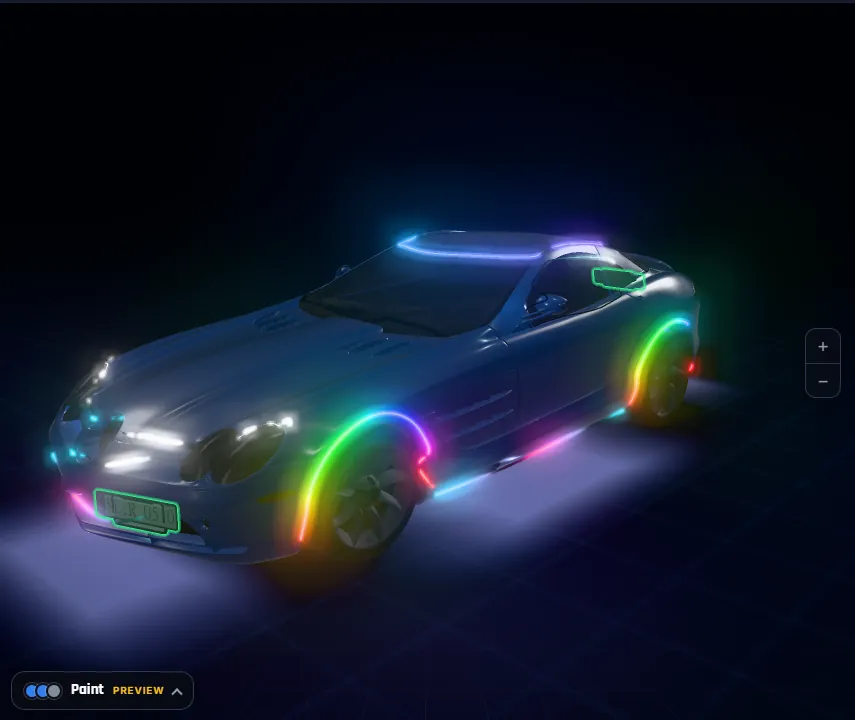
The vehicle_lightsemissive shader
Vehicle lamp lenses use a shader with an emissive channel. When the car’s matching light group is on, the surface lights up with an emissive multiplier that makes it look like a lit bulb; when it is off, it renders as plain colour. Because it is a normal material, any mesh on the car can use it, not only the original lenses.
Light IDs
The ID that connects a surface to a group is written into the alpha of the vertex colours of the mesh. One surface carries one ID. The Vehicle Studio uses these IDs for its triggers:
| Trigger | Light ID used | Lit when |
|---|---|---|
| Always | 0 | The car runs |
| Headlights | 1 and 2 | Low or high beams are on |
| Brake | 9 and 10 (11 on a car with one central brake light) | Braking |
| Reverse | 12 and 13 | In reverse |
| Indicator left | 5 (front half) and 7 (rear half) | Left blinker on |
| Indicator right | 6 (front half) and 8 (rear half) | Right blinker on |
| Hazards | left side 5 and 7, right side 6 and 8 | Hazards on |
These are the numbers our build uses, chosen from the lamp bones the car has, and we saw them behave in game on a sedan and a 6×6 pickup. The siren trigger is different: its strip is dark until a script sees the siren running.
Left and right come from the side of the car in the model, where GTA left is the negative X side.
Lamp bones
A car also has bones named after its lamps: headlight_l, headlight_r, taillight_l, taillight_r, brakelight_l, brakelight_r, brakelight_m, indicator_lf, indicator_rf, indicator_lr, indicator_rr, reversinglight_l and reversinglight_r in vanilla naming. They tell the game where to place the light sources and the glow. A car with only a central brake light bone (brakelight_m) uses the ID 11 group; a car with left and right ones uses 9 and 10. That is why the tool reads your car before it chooses IDs.
How an LED strip uses this
A strip built by the Vehicle Studio is a mesh with the vehicle_lightsemissive material, an emissive multiplier of 12 and the ID of the trigger you chose, so a brake strip glows when the car’s brake lights do. Its colours come from a texture named after the car model, which the client script redraws for animation. The still frame is baked in, so a strip is never dark just because the script is not running. See Animated car lights in FiveM for the texture side.
How do I make a custom part follow the brake lights?
- Find the lamp bones. Check which brakelight bones your car has: left and right, or only the middle one.
- Choose the ID. Use 9 and 10 for left and right brake lights, or 11 for one central light.
- Assign the shader. Give the part a vehicle_lightsemissive material and write the ID into the vertex colour alpha.
- Export and test. Export the model, stream it and press the brake in game.
- Or let the tool do it. In the Vehicle Studio LED tool pick the Brake trigger and check it with Simulate in game.
Lights not following?
- Wrong ID: the surface lights with another group, for example the left indicator when you wanted the brake.
- No lamp bone for the group: some groups need the matching bone to exist.
- Dim result: the emissive multiplier is low or the colour is dark. Brighter colours read better.
- Siren lights: police-style flashing lights come from siren settings in
carcols.meta, a different system. See Add police lights to a FiveM car and Emergency lights not working.
A worked example
Take a sedan with brakelight_l and brakelight_r bones, and a rear light bar you want to light with the brakes. The bar needs the vehicle_lightsemissive material and the ID 9 on its left half and 10 on its right half, so each half lights with its own lamp. Now take a car whose only brake bone is brakelight_m: the same bar would use 11 on the whole strip. If you used 9 and 10 on that car, nothing would light because no lamp group of that kind exists on it.
The same thinking applies to indicators. A strip along the front of the car uses the front half IDs (5 left, 6 right), and a strip along the rear uses the rear half IDs (7 left, 8 right). A strip that runs the whole length of one side can mix both halves so it blinks in step with that side’s blinker, which is what the hazards option of the tool does on both sides at once.
Finally, remember the three things that decide whether a lit surface looks good: the colour of the surface (dark colours barely glow), the emissive multiplier (our strips use 12) and the time of day. Check at night first, then in daylight.
Car light questions
What is vehicle_lightsemissive in GTA 5?
It is the shader used for vehicle lamp surfaces. It makes the surface glow when its light group is active, so a lens or any mesh using it can light up with the brakes, indicators or headlights.
What is a vehicle light ID?
It is a number stored in the vertex colour alpha of a mesh that tells the game which light group lights that surface, for example brake, reverse or an indicator.
Which light IDs does the Vehicle Studio use?
Always 0, headlights 1 and 2, brake 9 and 10 (11 for a single central light), reverse 12 and 13, left indicator 5 and 7, right indicator 6 and 8, and hazards both sides.
Why does my car have only one brake light?
Some models have only a central brake light bone, brakelight_m, and use the group 11 instead of 9 and 10.
Are siren lights the same as brake lights?
No. Sirens are configured in carcols.meta and linked with carvariations.meta. The siren trigger of an LED strip is lit by the script while the siren runs.
Can any part of a car follow the brake lights?
Yes, if it uses the vehicle_lightsemissive material with the brake light ID. The Vehicle Studio LED tool does this for strips and shows the result with Simulate in game.