
FiveM Underglow: Native Neon vs LED Strips
FiveM underglow comes in two kinds. Native neon is a built-in GTA feature: four coloured lights under the car, switched with natives such as SetVehicleNeonLightEnabled. LED strips are real geometry on the car body that glow. Native neon lights the ground, strips are visible on the car, and the FiveMRides Vehicle Studio can build both together.
- Native neon: light only, four positions (left, right, front, back), one colour at a time, controlled by natives, per car.
- LED strips: visible tubes or tape on the body, any shape, many colours and animated effects, built into the model.
- Both: an underglow strip in the Vehicle Studio can also switch on the car’s native neon so the ground is lit as well.
- Cost: the LED tool is 1 credit per car.
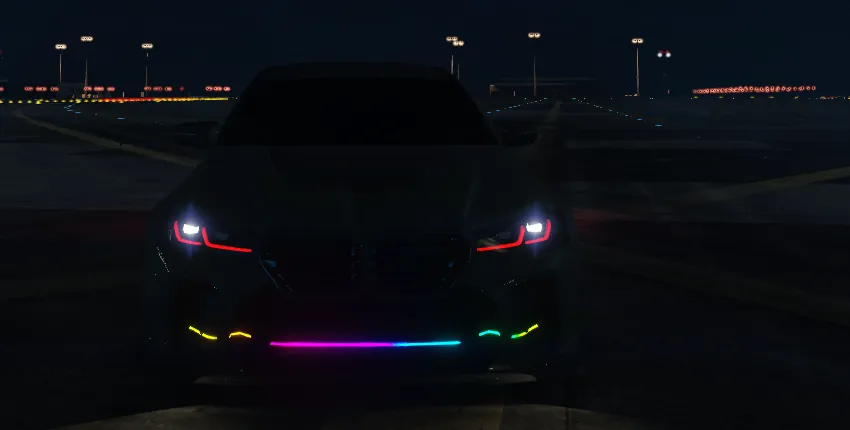
How native neon works
GTA has neon lights built into every vehicle. They are not a mesh. The game draws coloured light under the car at four positions, indexed 0 to 3: left, right, front and back. Scripts control them per vehicle:
SetVehicleNeonLightEnabled(vehicle, 0, true)   -- left
SetVehicleNeonLightEnabled(vehicle, 1, true)   -- right
SetVehicleNeonLightEnabled(vehicle, 2, true)   -- front
SetVehicleNeonLightEnabled(vehicle, 3, true)   -- back
SetVehicleNeonLightsColour(vehicle, 255, 0, 120)
Because it is a game feature, it works on any car without editing the model, and the state belongs to the car, so a server script can sync it. The limits: one colour for all four positions at a time, no animation unless a script changes the colour every frame, and nothing to see on the car itself, only the light on the ground and the surroundings.
How LED strips differ
An LED strip is geometry. You can see the tube along a sill, around a wheel arch or around the grille, even from far away in daylight, and its material emits light at night. Strips can follow brake and indicator lights through GTA’s light groups, take 1 to 6 colours and run 13 effects. They cannot light the ground by themselves, which is why the two work well together. More on strips in FiveM LED strips and underglow: the complete guide.
Native neon vs LED strips
| Native neon | LED strips | |
|---|---|---|
| What it is | Game lights under the car | Geometry on the body with a light-emitting material |
| Visible on the car | No, only the glow it throws | Yes, in any shape |
| Lights the ground | Yes | Not by itself |
| Colours | One at a time (RGB) | 1 to 6 colour stops per strip, 13 effects |
| Needs a script | Yes, to switch it | Not for lighting; a script is used for the animation and /led |
| Follows brake or indicators | Only if you script it | Yes, through GTA light groups |
| Model edit | None | Yes, built into the vehicle files |
| Scope | Per car | Trigger and extras per car, animation frame per model |
Using both
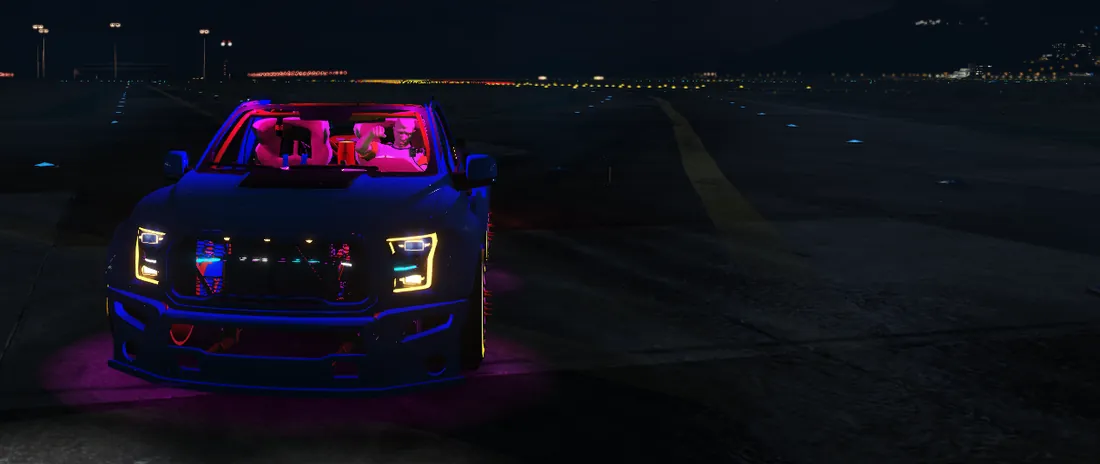
Because the strips are real geometry, the Underglow kit preset draws four strips under the sills and bumpers with Underglow switched on. In game the script switches the car’s native neon on, with a colour taken from the strip’s effect, so you get the visible tubes and the light on the road. Turn Underglow off on a strip when you only want the tube.
How do I add underglow to a FiveM car?
- Upload the car. Open the FiveMRides Vehicle Studio and upload your car.
- Use the Underglow kit. Open LED and click the Underglow kit preset: four strips appear under the car.
- Pick a profile and colours. Neon tube looks best for underglow. Choose colours and an effect, for example wave or gradient.
- Keep Underglow on. This is the option that also lights the ground with the native neon.
- Preview at night. Turn on Night mode and check the glow and the ground pool.
- Build and install. Download the resource, start it on your server and use /led or the J key in game.
Native neon without the tool
If you only want native neon, a short client script is enough: enable the four indexes and set a colour, ideally from a key or a command. Remember that your server may already have a neon or vehicle menu that does this. The tool is useful when you also want the visible strips, the effects and the brake and indicator behaviour.
Underglow problems
- No ground light: the strip needs Underglow on, and the script must run. Check
/ledstate in game. - Another resource changes neon: two scripts writing neon colours fight each other, and the last one wins every frame.
- Looks weak in daylight: light on the ground is subtle by day. Judge it at night.
We saw the underglow light the ground in game on a sedan and a 6×6 pickup. GTA V Enhanced was not tested.
Design tips for good underglow
- Pick one or two colours. A gradient between two neighbouring colours looks cleaner than a rainbow on a small car.
- Keep the tube a few centimetres inside the sills. A strip visible from the side reads as a bar; hidden under the body it reads as glow.
- Use the same phase on the left and right strips for symmetrical effects, and half a cycle apart for a chase around the car.
- Match the trigger to the job. Underglow is usually always on; accent strips such as a rear bar are better on brake.
- Judge it at night, from a normal driving camera. The editor’s Night mode shows a glow pool on the floor, but the game’s lighting is the final word.
If your server has many cars with underglow, think about the visual noise: bright ground pools add up. A server rule such as underglow only on show cars, or a key to switch it off, keeps streets readable.
FiveM underglow questions
What is the difference between native neon and LED strips in FiveM?
Native neon is a GTA feature that draws coloured light under the car at four positions, controlled by natives. LED strips are geometry built into the car that you can see on the body and that glow at night.
How do I turn on neon lights on a FiveM car?
Call SetVehicleNeonLightEnabled for the indexes 0 to 3 and set the colour with SetVehicleNeonLightsColour. With the Vehicle Studio LED tool, the Underglow option does this for you and /led or J switches it.
Can underglow change colour?
Native neon has one colour at a time, but a script can change it. A strip effect such as rainbow or wave can drive the neon colour so it follows the effect.
Does underglow work on any car?
Native neon works per vehicle without editing the model. The strips need a build for your specific car in the Vehicle Studio.
Do I need a script for underglow?
For native neon alone, yes, a short client script. For the Vehicle Studio build, the script is included in the resource.
How much does it cost?
The LED tool, including the underglow option, is 1 credit per car. The preview is free.