
FiveM Car Showcase Video: Make a 360 MP4 or GIF for Discord
A FiveM car showcase video is a short turntable clip of your build to post on Discord or social media. The FiveMRides Vehicle Studio makes one in your browser from the 3D preview: a 360 degree MP4 or GIF of the car with your paint, rims and add-ons, on a Sunset, studio, neon or plain background, with a small FiveMRides watermark. It is free, and it is made from the Studio preview, not an in-game capture.
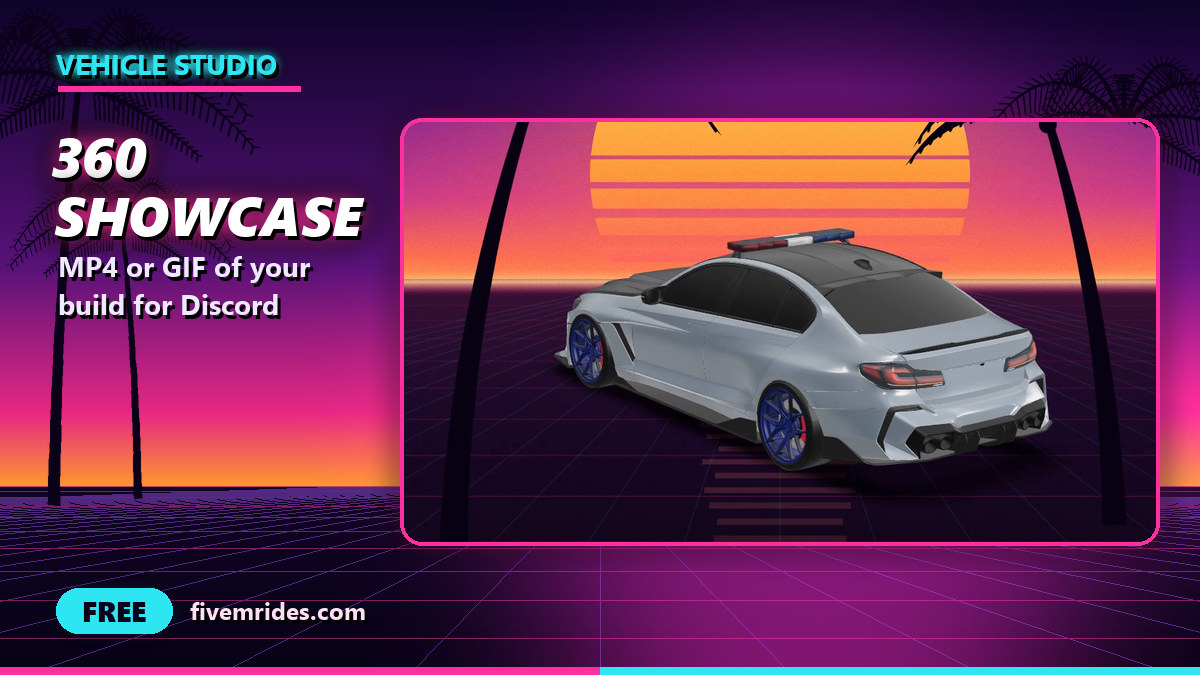
- Tool: Showcase video in the FiveMRides Vehicle Studio. Price: Free, no credits.
- Formats: MP4 (H.264) when your browser can encode it, WebM if not, or a GIF. Square 1080 or vertical 720 x 1280 (9:16).
- Length: 6, 8 or 10 seconds at 30 frames per second for video, a fixed 4 seconds for a GIF. The panel shows the final file size before you download.
- Watermark: a small logo and fivemrides.com in the bottom corner, always on.
- Honest label: made from the Studio preview, not an in-game capture.
What does the showcase video show?
The clip is a smooth turntable of the car in the Studio preview, with a slight camera elevation. It uses the build as you see it: the paint, rims, tint and the add-ons that the preview draws. No Studio buttons, gizmos or cursor appear in the frames. The render runs in your browser, so there is no upload, no build server, no GPU on our side and no credit.
| Option | Choices | Notes |
|---|---|---|
| Format | MP4 (H.264), WebM, GIF | MP4 needs a browser that can encode H.264. WebM is the fallback and is recorded in real time. GIF is smaller and shorter |
| Size | Square 1080 x 1080, vertical 720 x 1280 | GIF: 480 px square or 360 x 640, 12 frames per second |
| Length | 6, 8 or 10 seconds | 30 frames per second. A GIF is a fixed 4 seconds |
| Background | Sunset (default), dark studio, neon, plain | Sunset is a purple to orange sky with a striped sun, two palms and a faint neon grid, all drawn by us |
| Watermark | Logo and fivemrides.com, bottom right | Always on |
On our test car, a 6 second square MP4 came out at about 6 MB and a 4 second GIF at about 1.8 MB. A longer or more detailed car makes a bigger file, and the Studio lowers the size of a GIF automatically to keep it under about 9.4 MB. We aim for under 10 MB, which is the upload limit of a free Discord account at the time of writing.
Is it an in-game capture?
No. The clip is drawn from the browser preview with the Studio lighting, not from the FiveM client. Paint finish, glass, lights and ground will not match the game exactly, and parts the preview draws as approximate stand-ins stay approximate in the video. The panel says so on screen. If you need real footage, record it in game.
Can I make it before the build?
Yes. The video only needs the car loaded in the Studio, so you can make it while you design, before any build or credit, and again on the Done screen after the build. A project can also use a still frame of the car as its thumbnail, see saved projects and share links.
How do I make a showcase video of my FiveM car?
- Load your car. Open the Vehicle Studio and upload a vehicle you have the right to modify, or resume a saved project and upload the car again.
- Set up the look. Pick the paint, rims and add-ons you want to show. The video uses what the preview shows.
- Open Showcase. Use the Showcase button in the left rail, or “Make a showcase video” on the Done screen after a build.
- Choose format, size, length and background. The panel shows the expected file size. Pick a GIF for a small file, or MP4 for quality.
- Render and download. A progress bar shows the render and you can cancel at any time. Download the file and drop it in Discord or a social post.
Limits
- Built and checked with our own automated tests on a test car (MP4 square and vertical, GIF, a still frame, watermark pixels present, no interface elements in the frames, cancel). The Sunset background was checked by eye. Playback on Discord and on phones is not verified yet.
- Flashing lights from the Lights tool should flash in the video, but that path has been proven only with a test hook. Not verified on a real build yet.
- A slow computer only takes longer: frames are timed by a virtual clock. The WebM fallback is recorded in real time.
- Parts made by other tools should be hidden in the frames when they are Studio helpers; a helper we did not anticipate could show up. Check the clip before posting.
- The watermark cannot be turned off. That is the price of a free tool.
- Guests can try the panel but have to log in to download.
Showcase video questions
How do I make a video of my FiveM car for Discord?
Load the car in the Vehicle Studio, open Showcase, pick a GIF or a square MP4 and download it. It is rendered in your browser from the 3D preview, so no game capture is needed.
Is the showcase video free?
Yes. It costs no credits, and the preview is free too. A small FiveMRides watermark is always included.
Can I make a GIF of my FiveM car?
Yes. The GIF option makes a 4 second turntable at 12 frames per second, 480 px square or 360 x 640, and the Studio keeps it small enough to upload.
Can I make a vertical video for Shorts, Reels or TikTok?
Yes. The vertical option is 720 x 1280 (9:16), 6, 8 or 10 seconds.
Does the video show my add-ons, lights and paint?
It shows what the preview draws: paint, rims, tint and the add-ons with a preview. Some previews are approximate. Flashing lights are expected to flash but are not verified on a real build yet.
Can I remove the watermark?
No, it is always on. It is a small logo and fivemrides.com in the bottom corner.
Is it a recording of the game?
No. It is made from the Studio preview, and the panel says so. Use a game recorder for real footage.