
How to Make Custom Weapon Skins for FiveM: Replace, Skins and Install
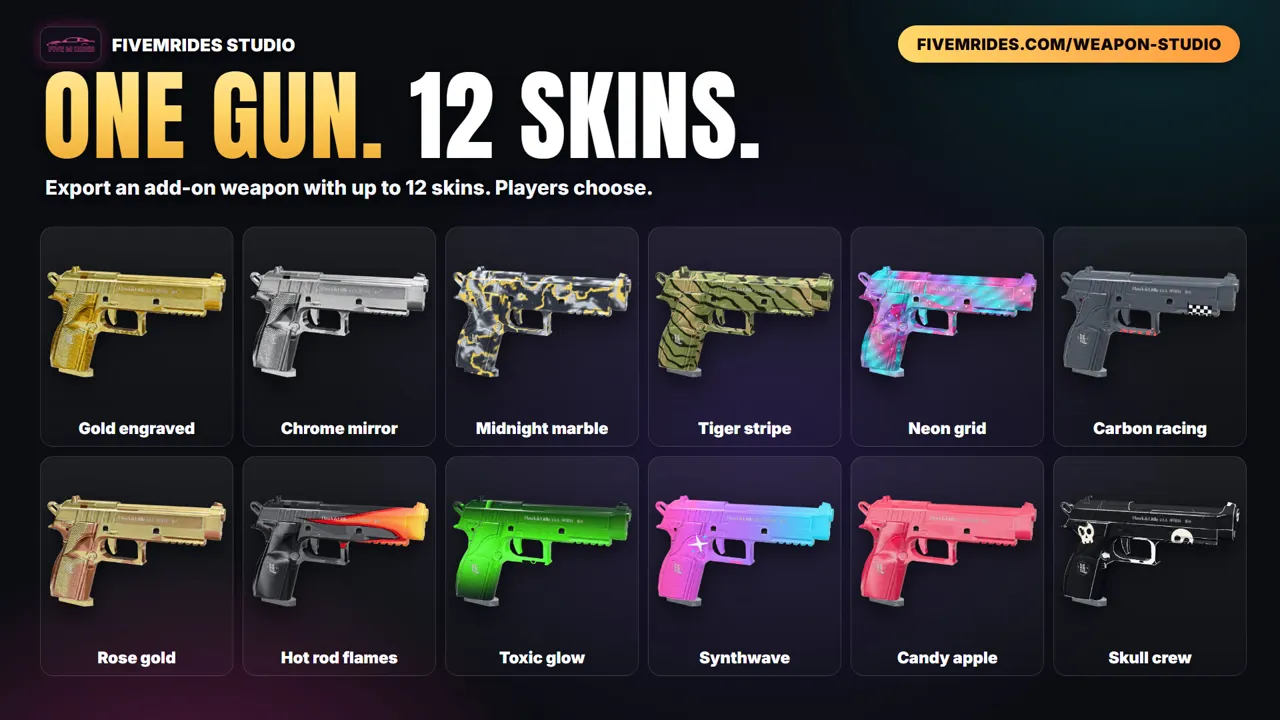
A custom weapon skin in FiveM is a repainted texture for a GTA weapon, streamed to every player by your server. There are two ways to ship it: replace mode swaps the vanilla look for everyone, and skins mode adds an add-on weapon whose skins are weapon components that players or your scripts choose. Here is how both work, the files behind them, how to install the resource and how to give the weapon and its skins in game. You can build it by hand, or paint it in your browser with the FiveMRides Weapon Studio and download a ready resource.
- Replace mode: the vanilla weapon looks different for everyone on the server. One texture dictionary, same file names as the game.
- Skins mode: a new add-on weapon with one weapon component per skin. The vanilla weapon is not touched.
- Install: copy the resource into
resources, addensurewith its exact name toserver.cfg, restart the server and reconnect. - Skins mode in game: give the add-on weapon, then apply a component.
- No tools? Paint it in the FiveMRides Weapon Studio: 1 credit per export.
What a FiveM weapon skin is
Every GTA weapon draws its look from a texture dictionary, a .ytd file with one sheet per part of the gun (body, slide, grip and so on). A weapon skin is a repainted version of those sheets. The game tints vanilla weapons with a fixed colour palette, which is why a tint can make a pistol gold or pink but cannot carry a painted design: a logo, camo or stripe needs new texture sheets.
A skin resource is a normal FiveM resource: an fxmanifest.lua, a stream/ folder with the textures (and models when needed), and for add-on weapons a set of weapon metas.
Replace mode or skins mode
| Replace mode | Skins mode | |
|---|---|---|
| What changes | The vanilla weapon’s look, for every player. | Nothing vanilla. A new add-on weapon is added next to it. |
| Who chooses | Nobody. The server decides. | Players, your inventory or your scripts, by applying a skin component. |
| How many looks | One per weapon. | Several skins on one weapon (the Weapon Studio builds 1 to 12). |
| New weapon name | No, the vanilla name stays. | Yes: WEAPON_ plus the resource name in capitals. |
| Best for | A server-wide look: every AK is your crew’s AK. | Collections to sell, unlock or hand out. |
| Conflicts | Two replace packs for the same weapon fight; the last one loaded wins. | None with vanilla. Keep one skins resource per weapon you ship. |
Why not simply patch the vanilla weapon to accept skin components? In our tests a resource that patched the vanilla pistol’s attach points did not make it take the new components, even though the same components worked on an add-on weapon. That is why skins mode builds a separate weapon: a copy of the latest vanilla definition (model, stats, sounds, animations, magazines, attachments) that accepts one component per skin, the same mechanism the game’s own luxury finishes use.
Make one in your browser
The Weapon Studio does the texture work and writes the files:
- Pick the weapon. Open the Weapon Studio and choose one of the 200+ vanilla weapons, plus any attachments you want to paint.
- Paint it. Paint on the 3D model or on the texture sheet with layers, patterns, finishes, text and stickers, or start from one of the 30 ready-made looks. Open the In hand view to see a GTA ped hold your weapon. You can also remix a design from the Community.
- Choose replace or skins. Replace mode swaps the vanilla look for everyone on the server. Skins mode builds an add-on weapon with each skin as a weapon component, so players choose.
- Export the resource. Export costs 1 credit and downloads a FiveM resource ZIP with the stream folder, metas and fxmanifest.
- Install and give the weapon. Copy the folder into resources, add ensure with its name to server.cfg, restart the server and reconnect. In skins mode, give the add-on weapon and then apply a skin component.
While you paint, open the In hand view: a male or female GTA ped holds your live-painted weapon and plays the game’s idle, aim, fire and reload animations, so you see the paint on the gun the way players will. Painted attachments are included in the export.
Do not want to start from a blank weapon? Browse the Community gallery and press Remix on a design you like: you get every layer, editable, for free. See weapon skins made by the community.
Texture mode makes a seamless tile from a description, such as “red dragon scales with gold edges”, and saves it to your texture library to use as a pattern on any weapon. AI is included only with Studio subscriptions.
The same page covers the paint tools: layers with blend modes, patterns, finishes such as chrome and gold, text in 9 fonts, 43 stickers, a wear effect and 30 editable ready-made looks.
The manual route
By hand, replace mode means editing the weapon’s .ytd in a texture tool, keeping the file name, sheet names, format and mipmaps the same as the game’s, then streaming it from a resource. Keep each texture under 16 MiB. Skins mode is a bigger job: a renamed model and texture dictionary per skin, a weapon info entry, a weaponcomponents.meta with one component per skin, archetypes, and an attach point that lists the components. It is doable, but it is many files that must agree with each other, and a mistake registers nothing without an error (see the troubleshooting guide).
Install the resource
- Unzip and put the resource folder inside your server’s
resourcesfolder. Thefxmanifest.luamust sit directly in that folder, not one level deeper. - Add
ensurefollowed by the exact folder name toserver.cfg. - Restart the server and reconnect, rather than restarting the resource while players are online. Weapon data is read when the game connects, and in our own test a live restart of a resource with weapon data crashed the connected player’s game.
- Replace mode: spawn the vanilla weapon as usual, it now wears your paint. Skins mode: continue below.
Give the weapon and its skins (skins mode)
In skins mode the weapon is named WEAPON_ plus your resource name in capitals, and the skins are COMPONENT_ plus the resource name, _SKIN and the number. For a resource called my_pistol_skins, that is WEAPON_MY_PISTOL_SKINS and COMPONENT_MY_PISTOL_SKINS_SKIN1. The README inside the ZIP lists the exact names for your pack. With plain natives:
local weapon = GetHashKey('WEAPON_MY_PISTOL_SKINS')
GiveWeaponToPed(PlayerPedId(), weapon, 120, false, true)
GiveWeaponComponentToPed(PlayerPedId(), weapon, GetHashKey('COMPONENT_MY_PISTOL_SKINS_SKIN1'))
Use DoesWeaponTakeWeaponComponent to check that the weapon accepts a component, and RemoveWeaponComponentFromPed to take a skin off. Attachments such as magazines and lights work together with a skin. Inventory and gun shop scripts each have their own way of giving a weapon and its components, so check how yours does it; we have not tested specific inventory scripts, so try the pack on a test server first.
About tints: vanilla tints are a palette recolour, not a texture. Exported weapons use a white palette so your paint shows as painted, which means a gun shop’s tint choice no longer recolours them. In our test, tint 2 on a skinned weapon left the skin as painted.
Make it with AI
Skip the texture work: describe a finish and the Weapon Studio AI paints the sheet you are on, or every sheet of the gun at once. Studio Max 12 per week, Studio Unlimited 17 per week AI designs with the Studio plans.
Questions about FiveM weapon skins
What files does a FiveM weapon skin need?
A weapon skin is a texture dictionary (.ytd) with one sheet per part, streamed from a resource with an fxmanifest.lua. Replace skins reuse the vanilla weapon's file names so the game loads yours instead. Skins that players choose also need weapon metas: weapon info, archetypes, animations and a weaponcomponents.meta that lists each skin as a component.
Can I have several skins on one FiveM weapon?
Yes. Vanilla tints are a palette and cannot carry painted designs, so the reliable way is an add-on weapon whose attach point accepts one variant-model component per skin, the same way the luxury finishes work. The Weapon Studio skins mode builds that for you, from 1 to 12 skins on one weapon.
Do weapon skins show for other players?
Replace and skins resources are streamed by the server, so every player downloads them and sees the same thing. Replace mode changes the look for everyone. In skins mode, other players see a skin when it is applied to the weapon in your hand. Scripts that apply a custom image on one player's own game only show it to that player.
Do I need OpenIV, Blender or CodeWalker to make a weapon skin?
By hand you need an image editor, a tool to write .ytd files and, for add-on weapons, a text editor for several meta files. The Weapon Studio paints in your browser and writes the textures, metas and manifest for you.
Can I make a custom tint colour for a weapon?
A tint is a row of a fixed colour palette: eight for normal weapons and more for Mk II. You cannot add a new colour to it from a resource. A custom colour or pattern needs a painted texture, which is what replace and skins packs provide.