
FiveM Weapon Skins Made by the Community: Browse, Remix and Share
The Weapon Studio Community is a public gallery of weapon skins that FiveMRides members painted in the Studio, plus seamless textures made with AI Texture mode. You can browse it, like what you see, and press Remix on any design: it opens in your editor with every layer intact, so you can change the colours, the text or the stripes and export it as your own FiveM weapon skin. This guide shows how to browse, remix and share, and what is and is not public.
- Browse: open the Weapon Studio and switch from Weapons to Community. Sort by Trending, New or Top, filter by category and weapon, or search a title or tag.
- Remix: you get a copy with every layer editable. It is free and uses no AI quota. Exporting costs the normal 1 credit (free with Studio Unlimited).
- Textures: community textures go straight into your patterns, free.
- Sharing: designs are shared when you export, as “by a FiveMRides member” unless you add a nickname. Only Studio subscribers can keep a design private.
- Never shared: a design that contains an image you uploaded.
The five steps
- Open the Community. Open the Weapon Studio and switch from Weapons to Community. Choose Weapon skins or Textures.
- Find a design. Sort by Trending, New or Top, filter by category and weapon, or search a title or a tag. Like the ones you want to see more of.
- Remix it. Press Remix this design. You get a copy with every layer editable. It is free to edit and save.
- Change it. Recolour stripes, change the text, delete or add stickers and layers, and check it on a GTA ped in the In hand view.
- Export and share. Export in replace mode or skins mode for 1 credit. Your design is shared to the Community by default, anonymous unless you add a nickname, and Studio subscribers can keep it private.
What the Community is
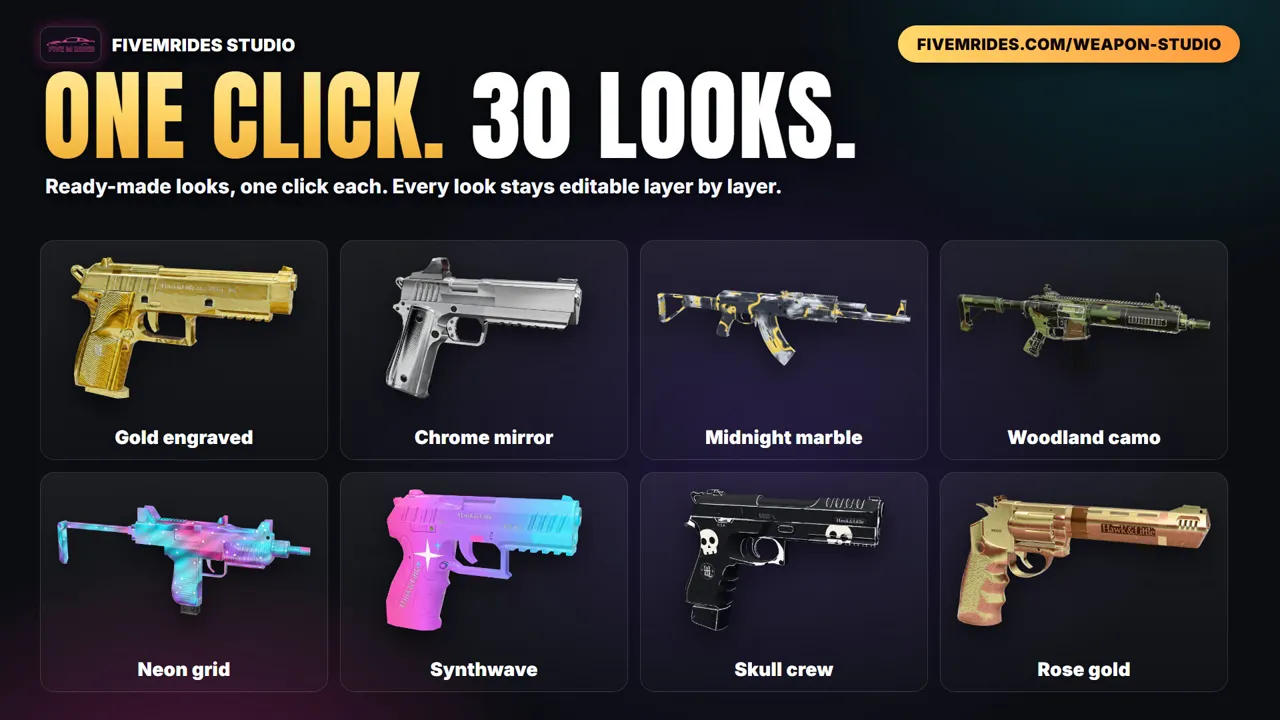
Every design in the gallery was made in the Weapon Studio and exported by a member. The gallery shows a picture of the painted weapon, its title, the weapon it is for, a like count and a Remix button. A design that an admin picked out carries a Featured badge and sits at the top of Trending. Each design also has its own public page that shows the picture and the weapon, so you can share a link to it.
The gallery does not hand out files. There is no ZIP to grab: if you like a skin, you remix it in the Studio and export your own resource, which is how you get a pack that is yours and that you can still change.
Browse and find a design
- Weapon skins or Textures: two tabs at the top of the gallery.
- Trending, New, Top: three ways to sort the same gallery.
- Filters: a category list and a weapon list, so you can look at pistols only, or at one weapon.
- Search: a title or a tag, such as a colour or a theme the creator typed.
- AI made: a switch that shows only designs made with AI.
- Likes: the heart on each card. Like the designs you want to see more of.
Remix a design
- Open a design and press Remix this design (or the Remix button on its card).
- The Studio opens a copy as your own project with every layer editable: you can recolour a stripe, change the text, delete a sticker or paint on top.
- Edit and save as long as you like. This is free and it uses no AI quota, even if the original was made with AI.
- Export as usual, in replace mode or skins mode. The export costs the normal price, 1 credit, and is free with Studio Unlimited.
A remix shows Remixed from and the title of the design it started from, and your remix is shared under the same rules as any other design (see below). Once you have the ZIP, installing it and giving the weapon works exactly as in How to make custom weapon skins for FiveM, and if a skin does not show, go through the 8 fixes.
Community textures and your patterns
Besides finished weapons, the Community has a Textures tab: seamless square tiles that repeat without a visible seam. A community texture goes straight into your patterns, free, and you can use it on any weapon like one of our own patterns.
You can also make your own with AI Texture mode. Describe a material, for example “red dragon scales with gold edges”, and you get a square 1024 px tile. The server fixes the seams, so the tile repeats cleanly. It is saved in your own texture library and you can use it as a pattern on any weapon. AI is included only with Studio subscriptions (Max 12 and Unlimited 17 generations a week), and a texture you generate is shared to the Community textures by default, like a design.
What is shared, and what is not
| Question | Answer |
|---|---|
| Is my design shared? | By default, yes: the share box at export is ticked, and you see it before you pay. |
| Can I keep it private? | Studio subscribers (Pro, Max or Unlimited) can untick the box. Everyone else sees it ticked and locked, with a note that says so. |
| What is public? | A rendered picture, the title, the tags and the weapon. Other members can remix the layers of a design that is live in the gallery. |
| Whose name shows? | “by a FiveMRides member”. You can add a nickname at export if you want credit. |
| What if I uploaded an image? | A design that contains an image you uploaded is never shared, whatever your plan. |
| Can I take it down? | Subscribers can unpublish their own designs. Without a plan you send a removal request and an admin decides. |
Your export itself is unchanged: the ZIP you download is yours, with or without sharing. Removing a design from the gallery does not reach into servers where you already installed it.
Who checks what is shown
An admin reviews every design before it appears in the gallery, and a rejected design is never shown. Anything with a real brand or logo, a real person, a hate symbol, sexual content, someone else’s art or insulting text is rejected, and titles, tags and nicknames are checked too. Members can report a design with Report this. When a design collects enough reports it is hidden until an admin looks at it.
Questions about weapon skins made by the community
Where can I find FiveM weapon skins made by other players?
In the Weapon Studio Community gallery, at /weapon-studio/community/ or on the Community tab inside the Studio. Every design was made by a FiveMRides member and approved by an admin before it shows.
Can I download a community weapon skin as a ZIP?
No. The gallery shows pictures, not files. To use a design you remix it in the Studio, which gives you every layer, and export your own resource in replace mode or skins mode.
Is remixing a design free?
Yes. Opening, editing and saving a remix is free and uses no AI quota. Only the export costs credits: the normal 1 credit, free with Studio Unlimited.
Do I need a Studio subscription to use the Community?
No. Anyone with a FiveMRides account can browse, like, remix and use community textures; AI Texture mode is the part that needs a Studio subscription. A subscription is needed to keep your own designs private.
What happens to my design when I export?
It is shared to the Community gallery by default, anonymous unless you add a nickname, after an admin approves it. A design that contains an image you uploaded is never shared. Studio subscribers can keep a design private.
Does the original creator get credit?
A remix shows Remixed from with the title of the design it started from. Creators are anonymous unless they chose a nickname.
Who checks the designs?
An admin reviews each design before it appears, and members can report anything that should not be there. Enough reports hide a design until an admin has looked at it.