
FiveM Clothing Clipping: How to Fix Arms and Undershirt Showing Through
When a FiveM top shows a white panel on the chest, a bit of the base undershirt at the hem, or bare skin at the sleeves, the shirt is usually fine. A top does not carry its own undershirt or arms, so the ped keeps whatever it wore before, and that does not always fit. The fix is to set the right undershirt (component 8) and arms (component 3) for each top, and to make that choice stick. This guide shows how, with the numbers we use, and three ways to apply it.
- White or grey panel: set the empty undershirt for that top. In the base freemode clothing it is 15 for male and 14 for female.
- Skin at the sleeves or wrists: set the arms (component 3) whose sleeve length matches the top.
- Make it stick: save both with the top in your outfit presets, apply them from a small script that reacts when the top changes, or use shop data in a menu that applies it.
- Only when the mesh itself goes through the body do you need to edit the garment.
The three components involved
| Component | What it is | What goes wrong |
|---|---|---|
| 11, tops | Jackets, shirts, hoodies | Drawn over the undershirt and the arms |
| 8, undershirt | The layer worn under the top | Pokes through when it is bigger than the room the top leaves |
| 3, arms | Arms and hands that show around the top | Skin shows at the sleeves, or arms poke out of them |
Fix the undershirt
- Wear the top on a freemode ped in your clothing menu.
- Step through the undershirt options. For most tops the right answer is the empty undershirt: 15 on the male ped, 14 on the female ped.
- Look from the front, the side and the back, and with the arms raised, before you trust it.
- Note the top number and the undershirt that works, for each gender. A top with a deliberate shirt under it, such as a hoodie over a tee, is the exception: pick the undershirt that is meant to show.
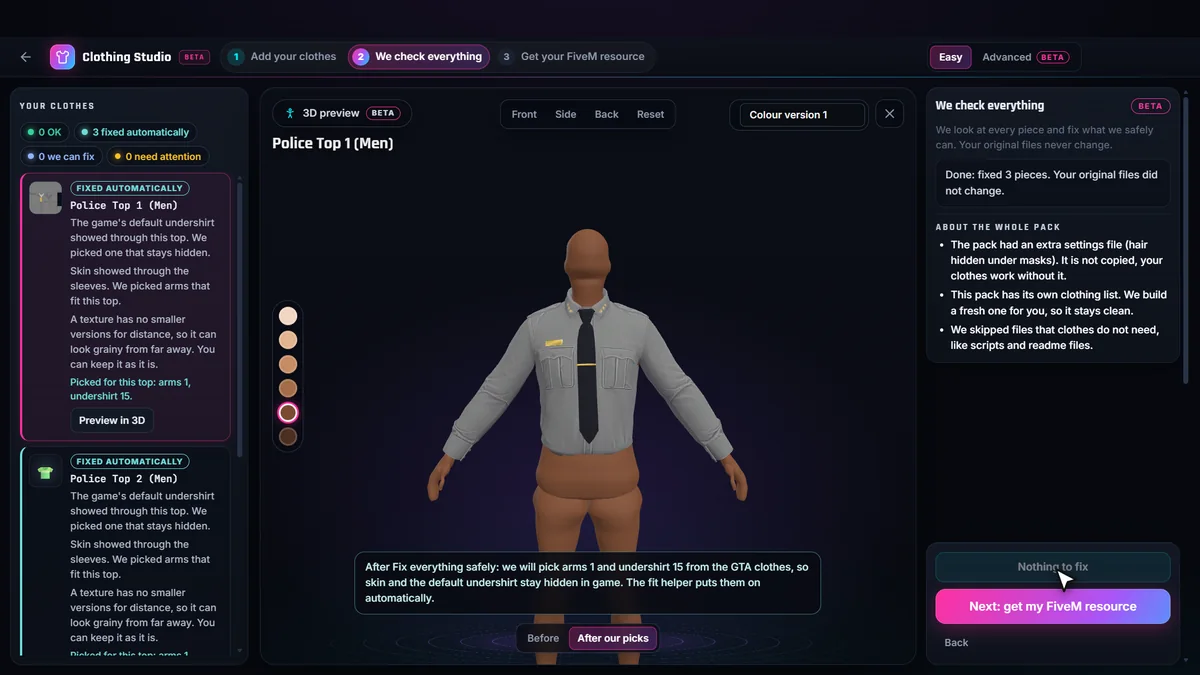
In our own test pack of police shirts, the three male tops all needed undershirt 15, and the female top needed 14 and kept its default arms. Your numbers will differ, which is why the choice is per top.
Fix the arms
- With the top on, step through the arms options and look at shoulders, elbows and wrists.
- Keep the first set with no skin showing and no arm poking through the sleeve.
- Pair it with the undershirt from the step above and write both down against the top.
Arms come bare, short, long and with gloves. In the same test pack two male tops took arms 1 and one took arms 11, so do not assume one pick fits a whole pack.
Three ways to make the fix stick
1. Outfit presets and job uniforms
If your server defines outfits, set component 3 and component 8 in each preset along with the top. It works everywhere that preset is used, but a player who changes the top by hand loses it.
2. A small script that follows the top
A client script can watch the worn top and, when it changes to one of the pack’s tops, set the matching arms and undershirt. A good one checks a few times per second rather than every frame, ignores the first check after the resource starts so it never overrides a player, only acts when the top changes, and never reverts when the player takes the top off, so arms and undershirt chosen by hand afterwards are kept. The Clothing Studio can add exactly this script to a pack as fmr_fit.lua. It works with any clothing menu. We checked it in game on a test pack: the picks were applied to every top, and the photos showed no white panel or skin.
3. Shop data in a menu that applies it
Add-on packs can carry the picks as forced components in their catalogue data, and a menu that reads it applies them when the item is worn. The FiveMRides wardrobe menu does. Other menus ignore the data unless they were written for it, which is why the script above exists.
When the mesh itself is the problem
If part of the garment goes through the body even with the right arms and undershirt, for example a stiff collar through the neck, no component choice will fix it. The garment has to be adjusted. Advanced mode of the Clothing Studio (BETA) has 3D fit tools that adjust the garment near the problem in the browser, and you check the result on the 3D mannequin before you export. The preview is not the GTA body, so confirm the fit in game.
Test it properly
- Test both genders and every colour of each top; a colour variation of the same top keeps the same picks.
- Look at rest pose, arms raised and crossed arms.
- Try the top over a few different undershirts and arms to confirm the script, not luck, is doing the work.
- Check that a player can still change the arms and undershirt by hand afterwards.
Do it for the whole pack BETA
Choosing arms and undershirt for each top is slow on a pack with dozens of tops. The FiveMRides Clothing Studio measures every top against the body on our server, picks the undershirt and arms for the tops that need them, and builds the optional fit script into your resource. Checks and the 3D preview are free with an account; a build is 1 credit, free with Studio Unlimited. It is a BETA and its picks are a starting point: look at the result in game.
Questions about clothing clipping
Why does the white undershirt show through my FiveM top?
A top does not choose its own undershirt. The ped keeps the one it already wore, and if that undershirt is bigger than the room the top leaves for it, it pokes through, often as a white or grey panel. Setting the empty undershirt for that top, for each gender, hides it.
Which undershirt number is empty in FiveM?
In the base freemode clothing the empty undershirt is 15 for male and 14 for female (component 8). Some packs ship their own undershirts, so check the numbers in your menu.
Why does skin show at the sleeves?
The arms (component 3) were not matched to the top. Short, long and glove arms exist, and a long sleeve over short arms leaves skin at the wrist. Pick the arms that fit the sleeve, then keep them with that top.
Why do arms and undershirt reset when I change clothes?
Most menus apply one component at a time and do not know which arms or undershirt belong to a top. A small client script that reacts when the top changes can set them. The Clothing Studio can add one to the resource, and players can still change the arms and undershirt by hand afterwards.
Can clipping be fixed in the model itself?
Sometimes. If the garment mesh goes through the body, the Advanced mode 3D fit tools can adjust the garment near the body in the browser. For undershirt and arms problems the fix is almost always the component choice, not the mesh.