
FiveM Clothing Not Showing? 9 Fixes, in the Order to Check Them
When FiveM add-on clothing does not show, the cause is almost always one of a short list: the resource is not really running, you are on the wrong ped, your menu does not list add-on clothes, the client has not picked up the new files, the pack is over a limit, a texture is too big, or the file names do not match. Below are nine checks in the order that wastes the least time, with the numbers we use ourselves when testing packs.
- Check first:
fxmanifest.luais directly in the resource folder,ensureuses the exact folder name, and the server console shows no error for it. - Then: you are on
mp_m_freemode_01ormp_f_freemode_01, and your clothing menu really lists add-on clothes. - Restart the server and fully reopen FiveM. Testing a changed pack under the same collection name can show old data, so use a new name.
- Limits: 255 drawables per type, per gender, per collection; no single texture over 16 MiB.
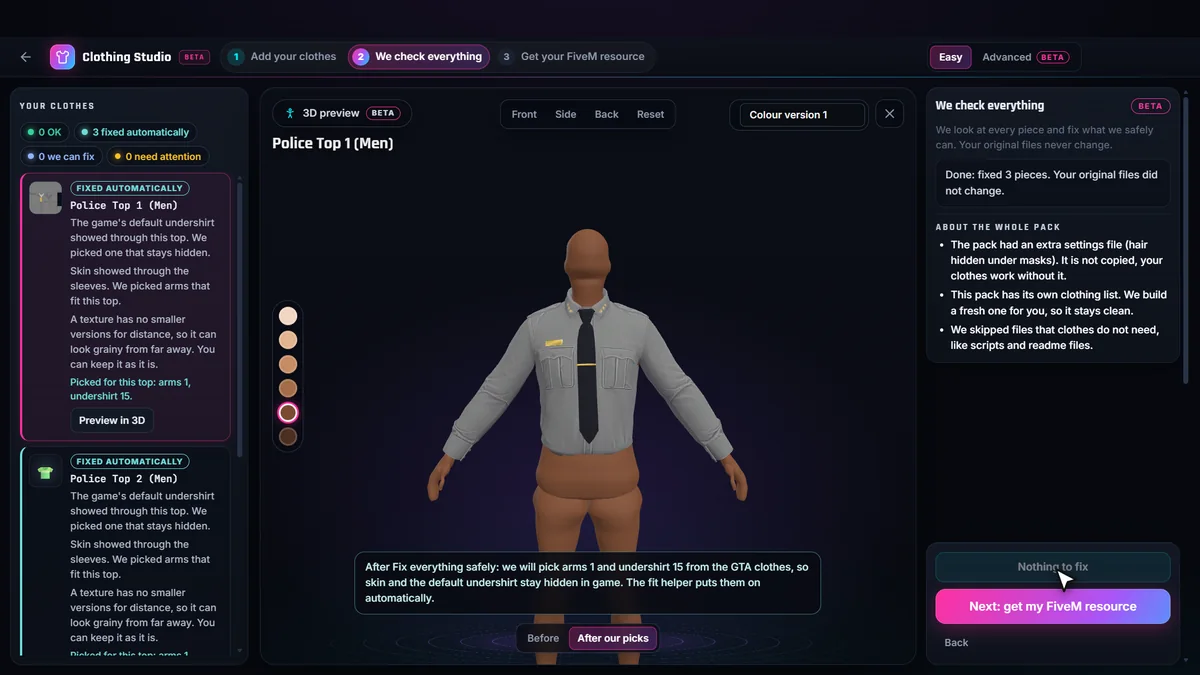
- Can’t see why: run the free check in the Clothing Studio (BETA); it lists missing files and slot problems in plain English.
9 fixes, in the order to check them
1. The resource is not running, or the folder is wrong
The folder must sit directly inside resources (or inside a category folder in square brackets) with fxmanifest.lua at its top level. A ZIP that unpacks into a folder inside a folder is the classic mistake. Check that server.cfg has ensure followed by the exact folder name, spelled the same, and read the console when it starts: “Couldn’t find resource” means the name or place is wrong, and an error line for that resource means a broken manifest or a file it cannot read.
2. You are not on a freemode ped
Add-on clothing works on the two multiplayer peds, mp_m_freemode_01 and mp_f_freemode_01. A custom ped, a story-mode ped or an animal does not use these collections, so nothing appears. Male clothes only show on the male ped, female clothes on the female ped. If only one gender works, see check 9.
3. Your clothing menu does not list the clothes
Some clothing menus and character creators keep their own lists or limits and need the new collection added to them. Test with something that reads the game directly. The optional FiveMRides wardrobe menu (F7 by default) in our packs lists every collection and marks items the game reports as missing with “NOT LOADED”, which tells you whether the problem is the files or your menu.
4. The server or the client was not restarted
Streamed clothing is read when a player connects. After adding a new collection, restart the server, then fully close and reopen FiveM before you join. Restarting only the resource while players are connected is the least reliable way to test clothes.
5. The client cached an older collection of the same name
The FiveM client remembers collections by name. If you change a pack and keep its name, a client that already loaded the old version can keep showing the old data or nothing. When testing, give each new build a new collection name (we do this on purpose with every test pack), and only keep one name for the final version. A second cause is two resources that register the same collection or stream the same files: keep one copy and remove the other.
6. The pack is over a limit
A collection holds up to 255 drawables per clothing type and per gender, and 26 colour variations per drawable. Past that, pieces are cut off or the resource misbehaves. Many servers also advise staying under 128 per collection on older builds. Split a big pack into several resources, each with its own collection. The Clothing Studio does this automatically and lists the ensure order.
7. A texture is too big
FiveM cannot load a single texture larger than 16 MiB of data. A 4096 by 4096 compressed (DXT5) texture with mipmaps is about 21.3 MiB, and a 2048 by 2048 uncompressed one is the same, so both stay invisible or white. 2048 pixels compressed is about 5.3 MiB and 1024 about 1.3 MiB. Heavy textures that stay under the ceiling still load late and cost memory, so shrink them to what the garment needs. Always compare before and after: resizing loses some detail.
8. File names and counts do not match
A model without its texture file, a texture dictionary named differently from its model, a YMT that counts more textures than exist, or a drawable number that skips a value all give invisible or untextured clothes. On a Linux server file names are case sensitive, so Stream and stream are different folders. The free check in the Clothing Studio reads the pack and lists these as missing files and duplicates before you build.
9. It shows, but looks wrong
If the piece loads but a white panel shows through the chest or skin appears at the sleeves, the clothes are fine and the undershirt or arms are wrong. That has its own guide: FiveM clothing clipping: arms and undershirt. If only the female (or only the male) clothes are missing, check that the files and the YMT for that ped exist and carry that ped’s name.
Skip the guesswork: check the pack for free BETA
The FiveMRides Clothing Studio reads a ZIP, RAR or resource folder and reports, piece by piece, what is ready and what needs attention: missing files, duplicates, heavy textures, slot counts. The check is free with an account and your files are never changed. If you build the resource there, a build is 1 credit, charged after the ZIP is built and verified, and free with Studio Unlimited. It is a BETA: test the result on a test server before players use it.
Questions about FiveM clothing not showing
Why is my FiveM clothing not showing?
In order of how often it is the cause: the resource is not running or its folder is wrong, you are on the wrong ped or gender, your clothing menu does not list add-on clothes, the server or client was not restarted, the client cached an older version of the collection name, the pack is over the 255 limit, a texture is over 16 MiB, or file names do not match.
Do I need to restart the server or only reconnect?
For a new collection, restart the server and fully close and reopen FiveM before you join. Restarting only the resource is the least reliable way to test clothing. If a pack keeps the same collection name after you changed it, the client can hold the old data, so test with a new collection name.
How big can a clothing texture be in FiveM?
A single texture cannot go over 16 MiB of data. A 4096 by 4096 DXT5 texture with its mipmaps is about 21.3 MiB, and so is a 2048 by 2048 uncompressed one, so both fail to load. 2048 or 1024 pixels with compression and mipmaps is the safe range for clothing.
Why do my clothes work for male but not female?
Male and female clothes are separate files for two different peds, and each gender has its own count and slots. If the female files or the female YMT are missing or named for the male ped, only male clothes appear.
Can I check a pack without starting a server?
Yes. The Clothing Studio (BETA) reads the pack in your browser session and lists missing files, duplicates, heavy textures and slot problems in plain English, for free, before you build anything.