
How to Fix FiveM Clothing Packs: Undershirt Clipping, Arms, Heavy Textures and Add-on vs Replace
Most broken FiveM clothing packs fail in the same five ways: the GTA undershirt pokes through the top, skin shows at the sleeves, textures are too heavy to stream, the same piece is in the pack twice, and replace packs overwrite each other. Each one has a clear fix, by hand or with a tool.
- White panel or undershirt poking through: set a hidden undershirt for that top.
- Skin at the sleeves: set the arms that match the sleeve length.
- Invisible clothes or texture pop-in: shrink oversized textures and check file names.
- Conflicts with other packs: ship the pack as add-on clothes instead of replace.
- Same piece twice: remove the duplicate copies.
How GTA clothing is put together
The multiplayer peds (mp_m_freemode_01 and mp_f_freemode_01) wear clothing in slots called components. Three of them matter for most fit problems:
| Component | What it is | What goes wrong |
|---|---|---|
| 11, tops | Jackets, shirts, hoodies | Drawn over the undershirt and the arms |
| 8, undershirt | T-shirts and vests worn under the top | Pokes through when the top was not made for it |
| 3, arms | The arms and hands that show around the top | Skin shows through or around the sleeves |
A top does not choose its own undershirt or arms. The ped keeps whatever it already wore, which is why a pack can look right for the creator and broken on your server.
Fix 1: the undershirt pokes through (the white panel)
On police shirts this usually shows as a white or grey panel on the chest or back. The base undershirt is bigger than the space the top leaves for it.
- Put the top on in your clothing menu.
- Go through the undershirt options until nothing shows through. For most tops this is an empty undershirt.
- Write down the top number and the undershirt that works, for each gender.
- Make sure that undershirt is set every time the top is worn: in your outfit presets, in your job uniforms, or with a small script.
Fix 2: skin shows through the sleeves
Arms come in different lengths: bare arms, short sleeves, long sleeves, arms with gloves. A long-sleeve jacket with short-sleeve arms leaves skin at the wrists; the wrong set can also leave gaps at the shoulders.
- With the top on, try the arms options and look at the elbows, wrists and shoulders from the side.
- Keep the first set with no skin showing and no arms poking out of the sleeves.
- Save it with the undershirt from Fix 1. Arms and undershirt belong together for each top.
Fix 3: invisible clothes, texture pop-in and FPS drops
Clothing textures live in .ytd files. Packs made for screenshots often ship 4096 pixel textures without compression or mipmaps. FiveM has to stream every one of them, and oversized assets can load late, pop in or not show at all, especially on busy servers. The server console warns about oversized assets.
- Most clothing looks close to the original at 1024 or 2048 pixels. Resizing always loses some detail, so compare before you replace a texture.
- Use compressed formats with mipmaps.
- Check the texture dictionary name matches its model. A mismatch also gives invisible or untextured clothes.
- On Linux servers, file names are case sensitive:
Streamandstreamare different folders.
Fix 4: the same piece twice
Packs built from several sources often contain the same model or texture under two names. Duplicates cost memory and fill menu slots with copies. Compare files by content, not by name, keep one copy and fix the slot numbers that pointed to the others.
Fix 5: add-on vs replace clothing
| Replace | Add-on | |
|---|---|---|
| What it does | Takes the place of GTA clothes with the same numbers | Comes after the normal GTA clothes |
| Next to other packs | Two packs can overwrite each other | Works next to other packs |
| Files | Model and texture files named after the original slots | A collection with its own metadata, declared in fxmanifest.lua |
| Best for | A deliberate swap of one GTA item | Servers that run several clothing packs |
Turning a replace pack into add-on clothes by hand means renaming every file into a new collection and writing the collection metadata and the shop data that lists each drawable and texture. It is where most hand fixes go wrong.
Names in menus
Most clothing menus show numbers. If your menu supports labels, give each piece a name your players understand, like “Police Shirt Long Sleeve”, and keep a list next to the resource.
Test before players see it
- Start the resource on a test server and watch the console for errors and oversized asset warnings.
- Try every top with its undershirt and arms, for both genders, from the front, side and back.
- Check your other clothing packs still show the right clothes.
Do it automatically: FiveMRides Clothing Studio BETA
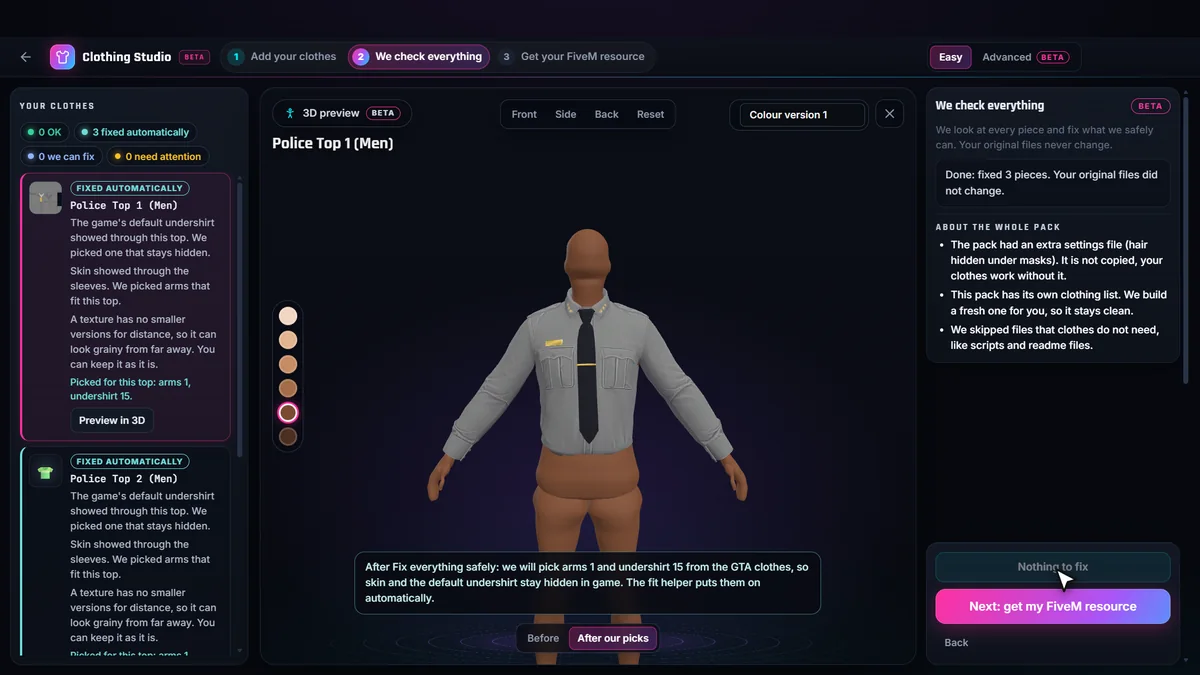
The FiveMRides Clothing Studio does the fixes above on a whole pack. You add a ZIP, RAR or resource folder and get back a FiveM resource. It picks the undershirt and arms for each top, shrinks textures that are too heavy, removes duplicates, can turn a replace pack into add-on clothes, gives pieces real names and adds an optional small script that puts the arms and undershirt on with any clothing menu. You see each piece on a 3D mannequin before you build.
Checks, fixes and the preview are free with an account. Building the resource costs 1 credit, charged only after it is built and verified, and it is free with Studio Unlimited. It is a BETA: test the result on your server before players use it.
FiveM clothing FAQ
Why does the GTA undershirt show through my FiveM shirt?
A GTA top is worn over an undershirt and a pair of arms. When the pack does not say which ones to use, the ped keeps the undershirt it already had, and it pokes through the top, often as a white panel on police shirts. Set an empty or matching undershirt for that top, for each gender, and make sure it is applied every time the top is worn.
How do I stop skin showing through the sleeves?
Pick the arms (the torso component) that match the sleeve length of the top: short sleeves, long sleeves or gloves. Try the arms in your clothing menu until no skin shows at the elbows, wrists and shoulders, then save that choice together with the undershirt for the top.
Why are my FiveM clothes invisible?
The usual causes are textures that are too heavy for FiveM, a texture dictionary that does not match the model name, a file that is missing from the stream folder, or a letter case mismatch on a Linux server. The guide on FiveM clothing not showing lists nine checks in order.
Should I use add-on or replace clothing?
Add-on clothing is safer on a server with several packs: it comes after the normal GTA clothes and does not overwrite anything. Replace clothing takes the place of GTA clothes with the same numbers, so two replace packs can overwrite each other. Use replace only for a deliberate swap of one GTA item.
Is there a tool that fixes clothing packs automatically?
Yes. The FiveMRides Clothing Studio (BETA) checks a pack for free, picks the arms and undershirt for each top, shrinks heavy textures, removes duplicates, can turn a replace pack into add-on clothes and gives pieces real names. A build is 1 credit and free with Studio Unlimited. Test the result on your server before players use it.