
01 / THE FOUNDATION2 credits / vehicle
Make it unbranded.
Your selected badges, decals and fixed plates. Original DLC preparation is included.
Included in this buildVehicle Studio Beta
Debadge it. Light it up.
Make it yours.
Remove badges and painted logos, add GTA vanilla style emergency lights, seats and new rims, tint the windows, pick an engine sound and make it bulletproof. One 3D editor in your browser, one ready-to-stream FiveM resource.
Free analysis and 3D preview with an account. Debadge 2 credits per vehicle; each extra (lights, seats, rims, window film) 1 credit per car.

Inspect your original vehicle and select the badges or painted logos to remove.
Sign in to open Vehicle Studio. Upload, analysis and the 3D preview are free with an account.
Log In Create AccountDrop a FiveM or DLC archive (.zip or .rar), or dlc.rpf - we prepare it and open the 3D preview automatically.
Up to 500 MB. One DLC per upload; FiveM packs supported. No extra conversion credit - debadging cost is shown before export.
Blender is loading the YFT and tagging probable badges. This takes about a minute on the first run.
Badges selected. Now make this build yours - one upload, your finished downloads.
Polygons are counted as triangles, including breakable parts. Base YFT and close-up (_hi) files are shown separately, not added as if they rendered together. Counts use each drawable’s highest available LOD.
Asset weight covers model and texture files, not ZIP compression or added sound packs. Targets are planning estimates before your badge edits; final exported files are measured again. Safety checks may keep a file unchanged. No FPS gain is guaranteed.
Get two downloads: your standard debadged vehicle and its bulletproof version.
Full protection includes a required tyre-protection script. Model compatibility is verified during export; unsupported builds are not charged. Test the result on your server. Fire and explosion protection is not included.
No paid extras are preselected. Failed builds are not charged. Downloading your completed ZIP again is free during its availability window.
Debadging, applying your selected extras and verifying the final files. Larger builds can take several minutes.
Both versions include your selected debadging, optimization, sound and handling. Install one version at a time: they use the same vehicle spawn name.
Use a modern browser with JavaScript and WebGL support. A desktop screen and mouse are recommended for precise selection.
Vehicle Studio tools Beta
Vehicle Studio is the Car Debadger with more tools on the left rail. Debadge, light it up, add seats, change the rims, the sound and the handling, make it bulletproof, tint the windows, then download one FiveM resource. Every tool previews free in 3D; each add-on is optional and costs 1 credit per car, its options included.
Debadge 2 credits / vehicle
Hover a badge and it lights up; click it and it disappears from the 3D car. Separate emblems and supported logos painted into the textures both come off, and Undo puts anything back.
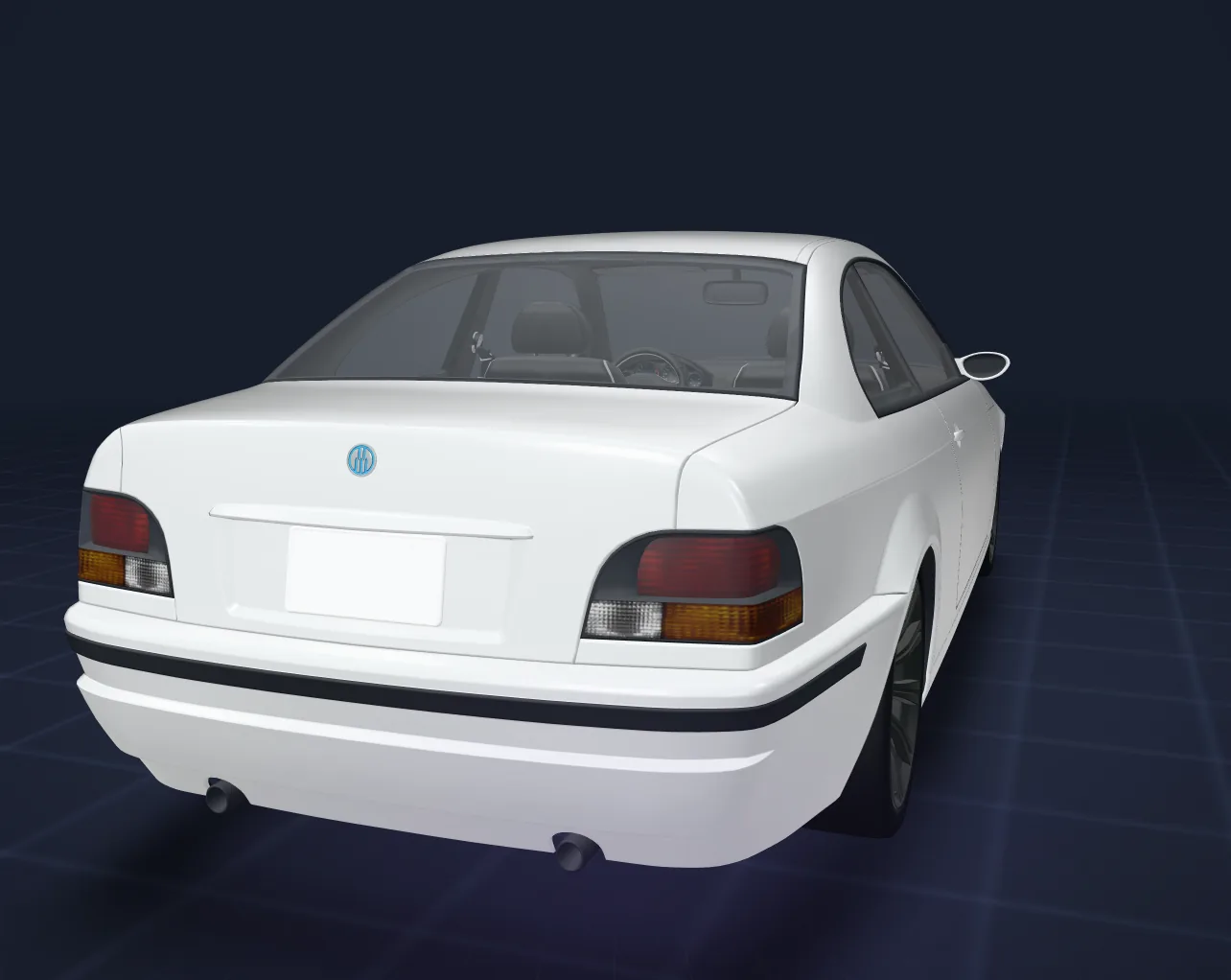
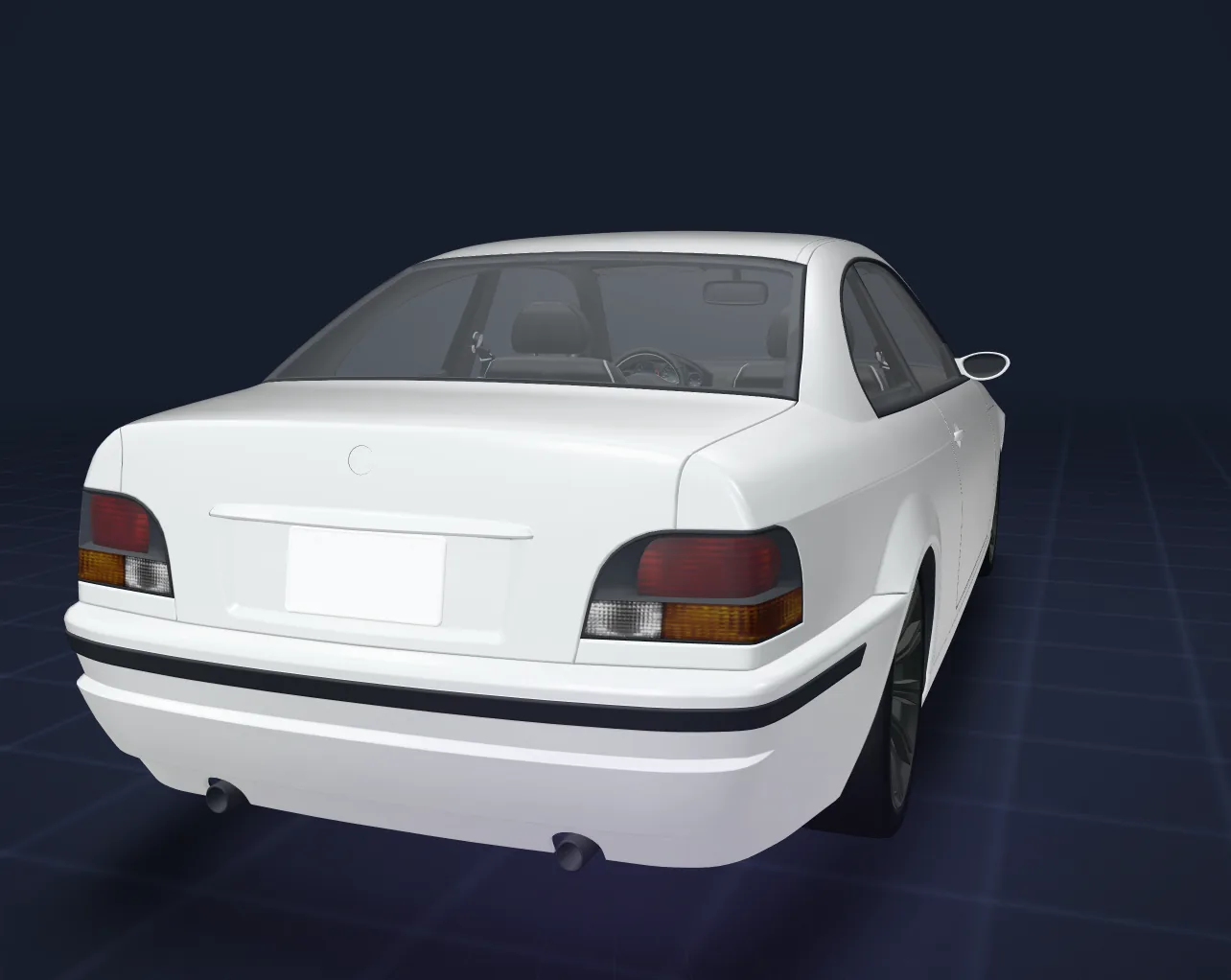

Emergency lights +1 / car
Drop a GTA vanilla style lightbar, push bar or LED strip on the car. It snaps to the roof, the grille or the glass and flashes live in the preview; the export writes real siren bones and a carcols siren entry.
How police lights work in a FiveM carEmergency lights not working?

Seats +1 / car
Click the cushion and a seated GTA ped shows exactly where the player will sit. Mirror it to the other side, set its place in the game seat order, or move the original driver seat.

Rims +1 / car
Pick a rim from the photo catalog and it appears on all four wheels in 3D. Each rim is fitted to the original wheel, same height and width, so the car drives the same.

Sound & handling +1 / car
Play engine sounds right in the editor, with suggestions for your car's make first, and pick the handling profile that fits your server. One extra credit covers the sound, the handling or both.
Road vehicles only. Works with or without debadging.

Bulletproof +3 or +5 / car
Choose Windows or Full and the protected parts light up on the 3D car. You get two downloads, the standard car and its bulletproof version, and the model is checked during the build.
One vehicle per upload. A car that cannot take it is not charged. Fire and explosion protection is not included.

Window film +1 / car
Pick the windscreen, the side windows or the rear window, choose a colour and set how dark it is: the film shows live on the 3D car. It is built into this car's own glass, so nothing else on your server changes.
One vehicle per upload. If the glass of a car cannot take a film (for example glass shared with the lamps), the build says so and no credit is used.
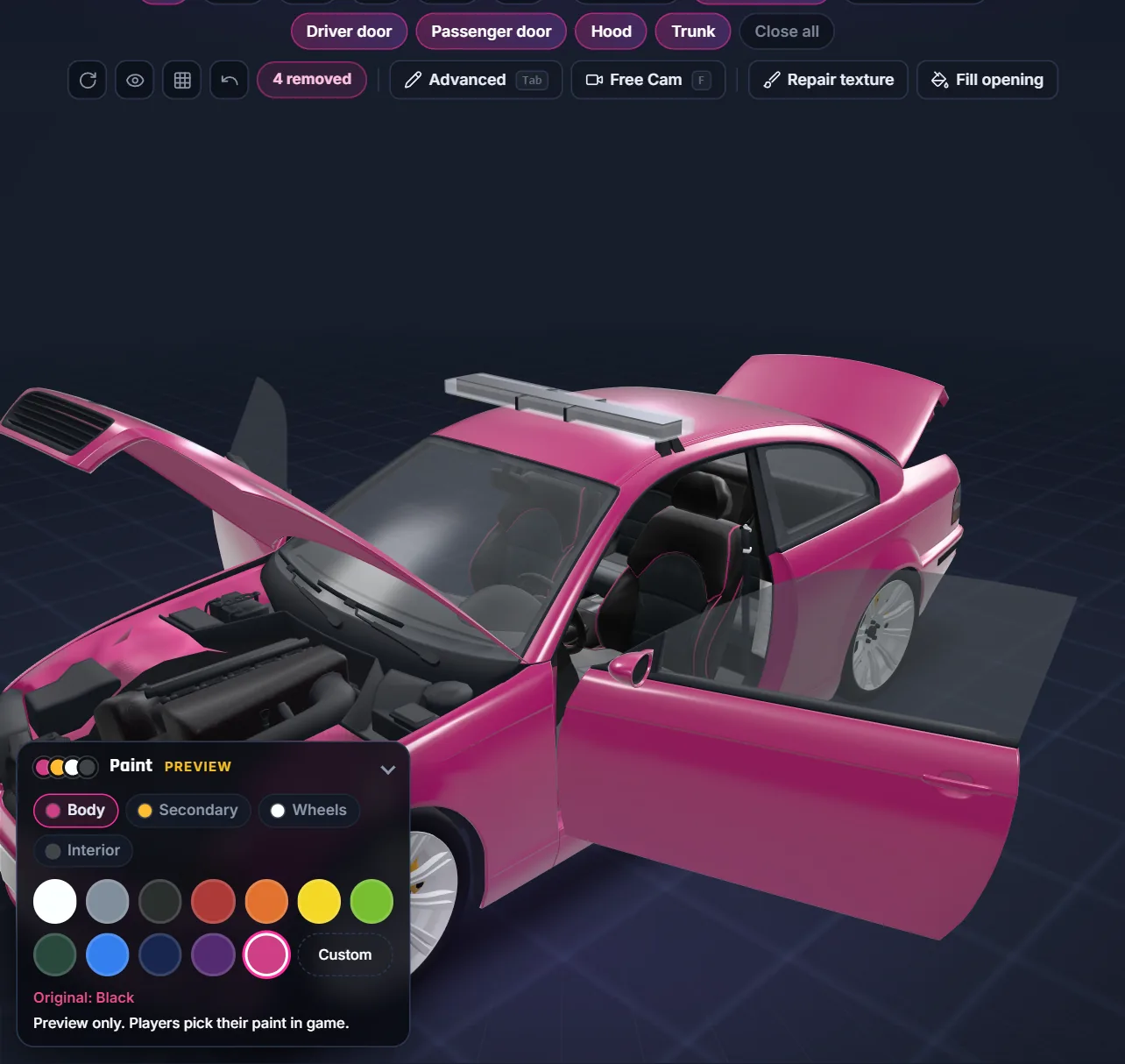
Paint & open parts Free preview
Try body, secondary, wheel and interior colours on the 3D car, and swing the doors, hood and trunk open on the hinges stored in the model to reach the badges hidden inside.
Players still pick their paint in game; the preview helps you judge badges, lights and rims on the colour you will drive.
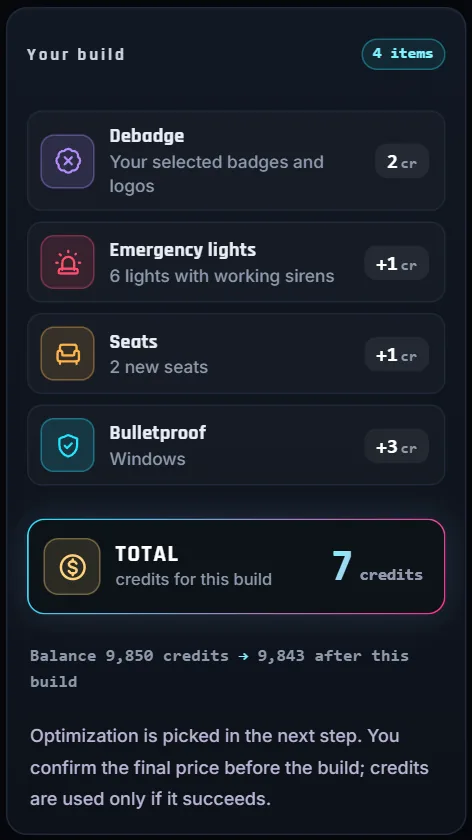
Your build Live total
The Your build card lists each tool you used with its credits, keeps a running total and shows your balance after the build. The final quote is confirmed before anything runs, and credits are used only when the build succeeds.
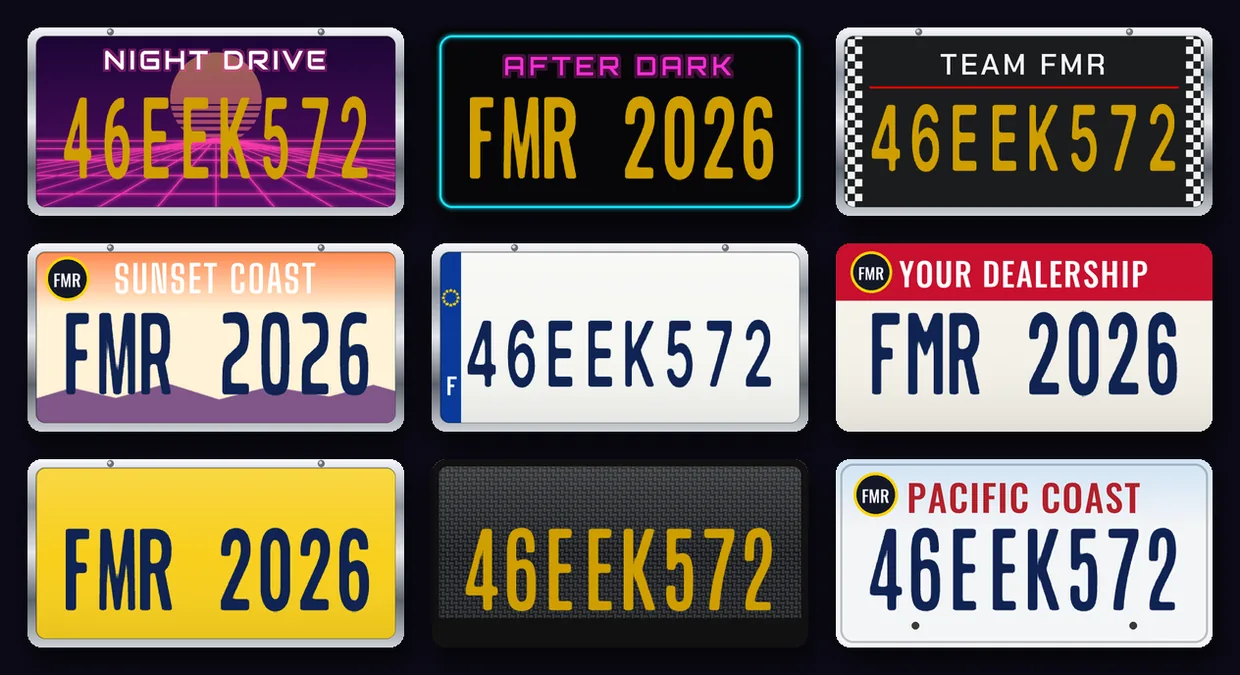

Plate Creator Free
Design the licence plate of one car around the number your server already gives it: GTA keeps drawing the real plate text, so garage, police and framework scripts read it as before.
Tested in game. Your font is built into this car only. Your background replaces one of the extra GTA plate styles 6 to 12 (never given to cars by default) on your server, your car spawns with it, and any vehicle set to that style shows it too. Needs game build 3095 or newer. Prefer the normal GTA plate? Pick Font only.
From original to export
You make the choices in the browser. Our servers process the vehicle, so there is no local Blender installation to set up.
Upload
Sign in and upload a FiveM or DLC archive (.zip or .rar), or dlc.rpf, up to 500 MB. Use one DLC per upload. Keep a separate copy of your original.
Select
Rotate and zoom the 3D preview. Check the grille, rear badges, wheel centers, steering wheel and sills. Select unwanted badges and supported painted logos; undo a selection when needed.
Finish
Keep a debadge-only build, or add emergency lights, seats, rims, a window film, sound and handling or Bulletproof from the tool rail, and optimization in the Build options. Review the vehicle count and credit total before confirming.
Verify
Save the processed ZIP and inspect the result on your FiveM server. Check the appearance, tuning, lights and audio before adding it to your live fleet.
Your build, your options
Pay only for what you add. The quote lists every line and the total before you confirm, and build credits are charged after a successful, verified build.
Always free
0 credits
Debadge
2 credits / vehicle
Each add-on
+1 credit / car
Bulletproof
+3 / +5 credits / car
One vehicle with optimization and sound and/or handling: 4 credits total before armor. Packs are quoted per vehicle; Bulletproof supports one vehicle per build. Options start off. The quote is confirmed before processing and build credits are charged after success. Eligible active subscriptions include selected build options. Optimization estimates are not guaranteed FPS gains.
Add Glass for bulletproof windows or Full for glass, weapon-damage settings and tyre protection. Glass alone = 3 credits, Full alone = 5. Debadge + Glass = 5 credits. Debadge + Full = 7. Debadge + Full with optimization and sound and/or handling = 9. Full includes Glass; choose one mode. Debadging is optional; Bulletproof needs a supported single-vehicle upload.
A successful armor build provides a standard ZIP and a bulletproof ZIP. Save both within 2 hours and install one version at a time. Read the Bulletproof guide and calculate your credits →
Editing and processing each include 30 minutes, with separate clocks. Extra time costs 1 credit per 15 minutes, up to 90 minutes per clock, only when you confirm. Queue waiting does not consume processing time. Extensions are separate from subscription-covered builds. See the guide for extension and failed-build details.
Each add-on costs 1 credit per car: emergency lights, seats (added or moved), rims (options included) and window film. Add-ons work on one vehicle per upload and can be built with or without debadging; without debadging there is no 2 credits debadge charge. Credits are charged only after the resource is built and verified: a failed build is not charged. Guides: add police lights, emergency lights not working, add seats.
See the workflow · 2 min 16 sec
Watch the FiveMRides Debadger workflow: upload a vehicle, inspect and select badges in 3D, choose optional optimization, sound, handling and Bulletproof, then build and review the result. Import and processing sections are visibly sped up.
The video uses music and on-screen labels, with no spoken narration. The steps above describe the demonstration in text.
Music: “Cipher” by Kevin MacLeod (incompetech.com), licensed under CC BY 4.0. Edited excerpt, adjusted volume and fades.
Know your model
Geometry
Select badge geometry in the viewer. Interior and open-parts views help you reach emblems around the cabin, wheels and engine bay.
Textures
Inspect detected texture thumbnails and use the painted-logo controls. Shared texture sheets need precise selections so nearby details stay outside the edit.
Model limits
Raised or recessed letters that form part of the body can need manual modeling. Removing a texture logo does not flatten the underlying panel.
Automatic detection helps you find candidates. It does not guarantee every logo has been found or that every vehicle can be edited successfully. The current release is beta.
Inside the resource
The same steps a modder would do in Blender, CodeWalker and a text editor, done on our servers. Your original upload is never modified.
.yft and _hi.yftLights: siren bones (siren1 to siren20) added at the end of the skeleton, lenses on the GTA light shader, housings on every detail level. Seats: seat bones added at the end of the skeleton; a moved original seat keeps its bone, moved to the new place. Rims: the wheel model replaced by the chosen rim on every detail level, fitted to the original wheel, its textures packed in the model. Existing bones keep their index and position..ytd (and the .yft glass UVs when needed)Window film: the glass texture of the chosen windows gets the film colour and darkness, in this car's own texture dictionary. When one texture is also used by windows you did not choose, the glass UVs of the model are split so only your windows change. Shared GTA files and other cars are not touched.carcols.metaA Sirens entry on a free slot: flash sequencer, colour and corona for each light, head and tail light wig-wag.carvariations.metasirenSettings pointing at that siren entry; the default wheel colour when you pick a rim colour.vehicles.metaEmergency class and flag when lights are added; the new seat layout and numSeatsOverride when seats are added.vehiclelayouts.metaA layout for this car with the original seats plus yours, reusing vanilla seat and door entries where they fit.fxmanifest.luaData files in the order GTA needs: layouts, handling, vehicles, carcols, then carvariations.Tested in game
That is a few cars on one server. Cars, siren scripts and servers differ: test your resource before players use it, and close FiveM completely after you update a car.
Good to know
Choose the right route
The tool edits a vehicle you already have. Removing its branding does not turn the underlying design into a fictional GTA car.
Before your first build
Vehicle Studio is the FiveMRides Car Debadger grown into one 3D editor for your own FiveM car. In the same session you can remove badges and painted logos, add emergency lights (GTA vanilla style lightbars, a push bar and LED strips with working sirens), add or move seats, change the rims and give the windows a coloured film, then download one ready-to-stream FiveM resource. It is in beta.
Upload the car, open Emergency lights, pick a lightbar, push bar or LED preset and drop it on the car: it snaps onto the roof, the grille or the glass. Move, rotate or scale it, choose red, blue, amber or white per light and a flash pattern, and watch it flash in the 3D preview. The export adds siren bones and light lenses to the model, a siren entry in carcols.meta and the sirenSettings link in carvariations.meta. Emergency lights cost 1 credit per car.
Non-ELS. The export uses the native GTA siren system (siren bones and a carcols.meta Sirens entry) and sets the car to the emergency class, so the lights are driven by the game or by a siren script that works with native sirens. We tested them with Renewed-Sirensync on a FiveM server. The tool does not write ELS configuration files.
The usual cause is a siren slot conflict. GTA only keeps the last 8 bits of a carcols siren id (256 slots), and in our tests the first resource loaded keeps a slot. Vehicle Studio picks a slot that no vanilla siren and no FiveMRides catalog car uses and shows it when the build is done; it is also written in the resource. If another resource on your server uses the same slot, tell us on Discord. After any change, close FiveM completely before testing: the game keeps the first siren entry it loaded for the whole session.
Open Seats, click Add a seat and click the cushion: a seated GTA ped shows where the player will sit. Nudge it with the arrows, add the same seat on the other side, choose its place in the game seat order, then build. The export adds seat bones to the model, writes a vehiclelayouts.meta for the car and raises numSeatsOverride in vehicles.meta. A rear seat in a 2-door car is reached through the front door, like the vanilla Sentinel XS. You can also move the original seats to change where the driver or a passenger sits. Seats cost 1 credit per car, added and moved seats together.
Open Rims and pick one of 372 rims from the photo catalog: 219 lore-friendly rims, plus 153 creator imports in their own section. Filter by pack or finish, or search by name; the rim shows on all four wheels in the 3D preview. The export puts the rim in place of the car's own wheel model on every detail level, fitted to the original wheel (same height and width), so the car drives the same. Restore Original Rims puts the stock wheels back before you build. Rims cost 1 credit per car.
Yes, the options are included in the rims price. Rim colour works on the lore-friendly rims that take the GTA wheel colour: it becomes the car's default wheel colour, and players can still change it in a tuning garage. Creator import rims keep their own finish. Tyre colour is a solid colour (the sidewall lettering is removed). Width goes from 80% to 125% of the original wheel; the height stays the same, so the tyre diameter does not change.
Uploading, analysis and the 3D preview are free with a FiveMRides account. Debadging costs 2 credits per vehicle. Each add-on (emergency lights, seats, rims, window film) costs 1 credit per car. You can add lights, seats, rims or a window film without debadging, and then there is no debadge charge. The quote shows the total before you confirm, and credits are charged only after the resource is built and verified, so a failed build is not charged. Eligible active subscriptions include the build options.
Yes. Open Bulletproof in the tool rail and choose Windows (+3 credits) or Full (+5 credits: windows, weapon-damage settings and tyre protection); the windows, and the tyres for Full, light up on the 3D car. With nothing debadged there is no debadge charge. You get two downloads, the standard car and its bulletproof version, and the model is checked during the build: a car that cannot take it is not charged. One vehicle per upload.
Yes. Open Sound in the tool rail: listen to the 102 engine sounds in the editor (suggested ones for the make of your car come first) and pick one, and/or pick one of the 12 handling profiles such as Street, Drift, Racing or Drag. One extra credit covers the sound, the handling or both, and with nothing debadged there is no debadge charge. Road vehicles only.
Use the Film tool in FiveMRides Vehicle Studio: upload the car, open Film in the tool rail, pick the windows, one of 10 film colours or your own colour, and a darkness from 0 to 100 %, and the film shows live on the 3D car. The build puts the film into that car's own glass textures, so no other car on your server changes, and you download a ready-to-stream FiveM resource. Window film costs 1 credit per car, with or without debadging, one vehicle per upload. If the glass of a car cannot take a film, the build says so and no credit is used.
Yes. The Film tool has three window groups, windscreen, side windows and rear window, and you turn each one on or off; it shows how many window pieces of each group it found on your car. When one glass texture is shared with windows you did not pick, the build splits it so only your choice gets the film. A few cars share their glass with the lamps in a way that cannot be split: the build then tells you which windows to choose, and no credit is used. The price is 1 credit per car, whichever windows you pick.
Yes. Players can still add the normal GTA window tint on top of the film in a tuning shop; we tested it in game. The film is built into this car's own glass, so the tuning shop tint and every other car on the server work as before. Window film is a Vehicle Studio add-on at 1 credit per car.
Yes. The film only colours the glass: the windows still smash when shot, and the film shows again once the car is repaired, both tested in game. It does not make the glass bulletproof; that is the separate Bulletproof tool (Windows +3 or Full +5 credits).
Yes. Designing a plate costs 0 credits with a FiveMRides account. You can build a car with only a new plate at no charge, or add it to a debadge or other options: the quote then shows the plate as a free line. Pick one of 21 templates drawn by us, 8 frames, one of 16 plate fonts under the SIL Open Font License and your own logo, and see it live on the 3D car.
Yes. The number is not painted on: GTA keeps drawing the plate text your server sets, the same text ESX, QBCore, garages and police scripts read and change. The font you pick is built into this car only. The background is a GTA plate style: a small script in the car resource replaces one of the extra styles 6 to 12, which no car uses by default, for your whole server, and the car spawns with that style. Any vehicle set to that style shows your design, and the number colour comes from the style. It needs game build 3095 or newer. Tested in game on our server.
Yes. Add a PNG, JPG or SVG image, for example your server or club logo, then move and resize it on the plate; it is printed into the plate background. Keep it outside the number area so the number stays readable. Upload only artwork you own or have permission to use.
One vehicle per upload (packs can still be debadged). A car that already has siren bones cannot get new lights yet, but it can get seats and rims. Rims need a car with its own wheel model (most add-on cars have one). Each car is limited to 20 emergency lights, 16 seats and 128 bones in its skeleton; the editor shows the counters live. Some cars cannot be opened by the export engine: the tool says so before anything is charged. Test the resource on your server before players use it.
A FiveM car debadger removes selected manufacturer badges and logos from a vehicle mod. FiveMRides combines a browser-based 3D preview with tools for separate badge geometry and logos painted into textures. You choose what to remove and download the processed vehicle as a ZIP.
Sign in, upload the original vehicle ZIP, RAR or supported DLC, and inspect it in the 3D viewer. Select the badges or painted logos you want to remove, review your optional upgrades and credit total, then build and download the ZIP. Processing runs on our servers, so you do not need to install Blender locally.
Upload a FiveM vehicle or GTA V DLC archive (.zip or .rar), or a dlc.rpf file, up to 500 MB. The Debadger prepares supported DLC inputs for the viewer without an extra conversion credit. Use one DLC per upload. FiveM packs are supported, and the export quote counts the vehicles in the upload. Unsupported or unreadable archives must be corrected before processing.
An account is required. Analysis and the 3D preview do not consume build credits. Debadging costs 2 credits per vehicle; optimization adds 1, and sound, handling or both adds 1 more. For one supported vehicle, optional Glass adds 3 or Full armor adds 5. Review the quote before confirming; build credits are deducted after a successful verified result. Eligible active subscriptions include the selected build options. Time extensions are separate.
Yes, on supported single-vehicle uploads, with or without debadging. Open Bulletproof in the tool rail (or the Build options) and choose Glass for bulletproof windows or Full for glass, weapon-damage settings and tyre protection. Debadger + Glass totals 5 credits; Debadger + Full totals 7. A successful armor build provides standard and bulletproof ZIPs. Install one version at a time and test in FiveM.
Editing includes 30 minutes from the viewer session. Processing has a separate 30-minute allowance from execution; queue waiting does not count toward processing. Either clock can be extended by 15 minutes for 1 credit, up to 90 minutes, only with your confirmation. Eligible subscriptions cover build options, not these extensions. Already-used editing extensions can remain charged if a later build fails.
The viewer provides exterior and interior views, an open-parts preview and undo controls to help you inspect and select badges. Separate badge meshes and supported painted logos can be removed. Check every area you care about, including wheel centers, steering wheels and door sills; automatic detection is a starting point, not a complete inspection.
No. Lettering molded into a body panel, shared texture atlases and some normal-map details can require model-specific editing. Removing a decal does not necessarily remove a raised shape. The Debadger cannot recover parts already missing from your uploaded file. Start from an intact original and review the exported vehicle in FiveM.
Removing badges changes the branding, not the underlying vehicle design. It does not automatically create a fictional GTA vehicle or grant permission to use someone else's assets. Choose a lore-friendly vehicle if you want fictional styling, and check the permissions for the model you upload.
Yes. After selecting badges, you can optionally optimize the vehicle and choose an available engine sound or handling preset for supported road vehicles. These options are off by default. The tool reports measured file sizes and polygon counts after processing; estimated values shown before the build are not guaranteed results or FPS gains.
Keep your original archive and download the result before the temporary link expires. Test the exported resource on your FiveM server: spawn it, inspect the exterior and interior, and check wheels, tuning, lights and audio. File validation and the browser preview do not replace an in-game check.
Product documentation by FiveMRides. Updated . Need help with a particular model? See support options.
Ready when you are
Upload your car, try every tool in the 3D preview for free, and pay only for the build you confirm.
Open Vehicle Studio